

What is Entra ID?
Microsoft Entra is a set of identity and network access solutions. It enables enterprises to establish a Zero Trust security strategy and validates access conditions, checks permissions, encrypts connection channels, and monitors for compromise.
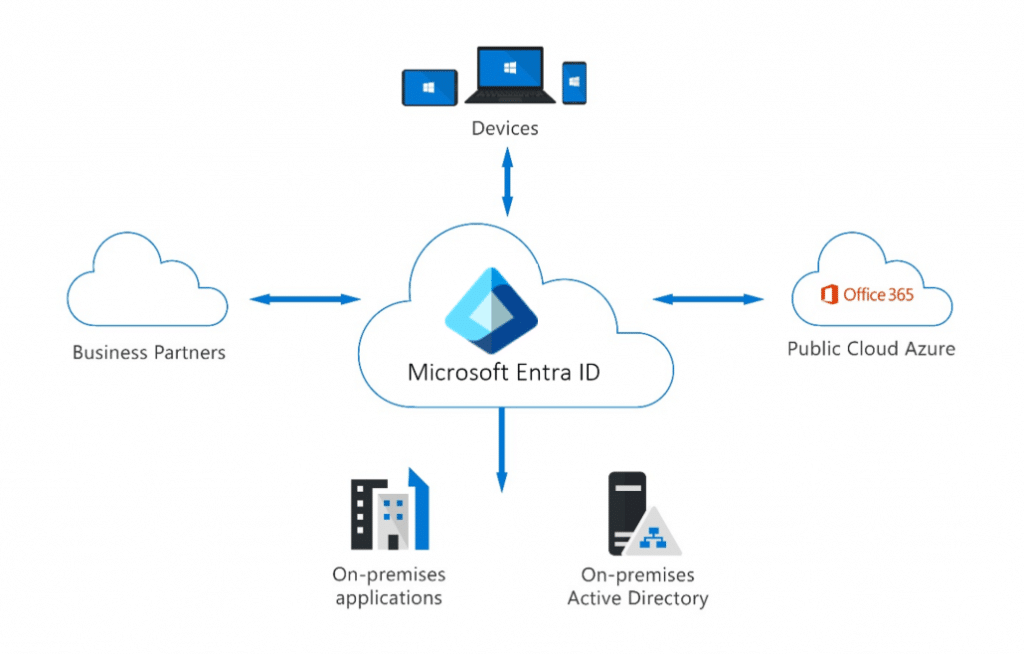
Microsoft Entra ID simplifies authentication and access management by delivering a single identity system for cloud and on-premises apps. Microsoft Entra ID can be synchronized with your current on-premises Active Directory, with other directory services, or as a stand-alone service.
Types of Identities
In Microsoft Entra ID, there are different types of identities that are supported. They are,
- User Identities
- Workload Identities
- Device Identities
- External Identities
- Hybrid Identities
User Identity
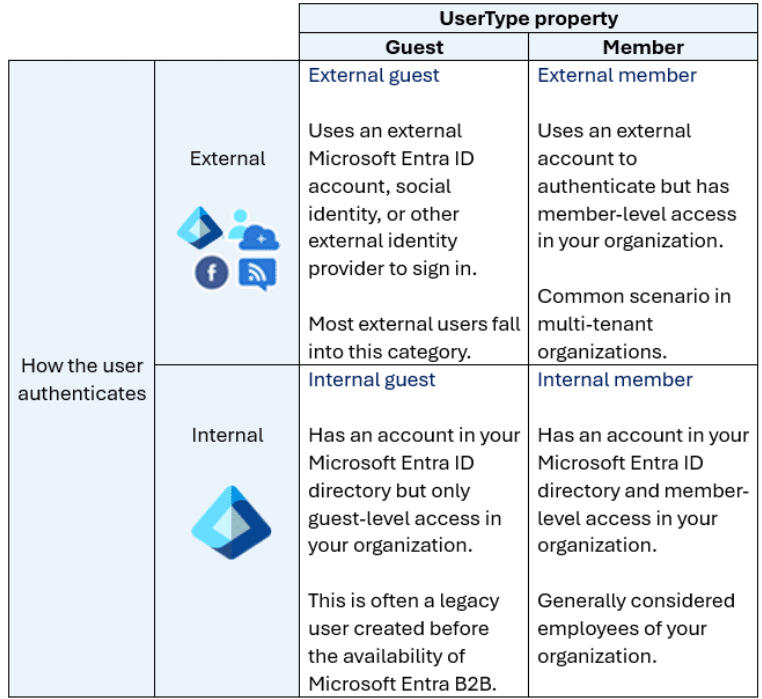
User IDs represent both internal and external users (customers, consultants, vendors, and partners). In Microsoft Entra ID, user identities are defined by their authentication method and the user type parameter.
Workload Identities
A workload identity is the identification you provide to a software workload. This allows the software workload to authenticate and access additional services and resources. This helps to safeguard your workload.
Device Identity
A device identity provides administrators with information to help them make decisions about access and configuration. Device identities can be configured in many ways in Microsoft Entra ID.
- Microsoft Entra registered devices - The purpose of Microsoft Entra registered devices is to enable users with support for BYOD or mobile device scenarios. In certain instances, a user can utilize their own device to access your organization's services. Microsoft Entra registered devices automatically register to Microsoft Entra ID without the need for an organizational account to sign in.
- Microsoft Entra joined - A Microsoft Entra connected device connects to Microsoft Entra ID via an organizational account, which is subsequently used to sign in to the device. The organization normally owns the Microsoft Entra connected devices.
- Microsoft Entra hybrid connected devices - Organizations with current on-premises Active Directory installations can benefit from Microsoft Entra ID capability by deploying Microsoft Entra hybrid linked devices. These devices are linked to your on-premises Active Directory and Microsoft Entra ID, requiring an organizational account to access the device.
External Identities
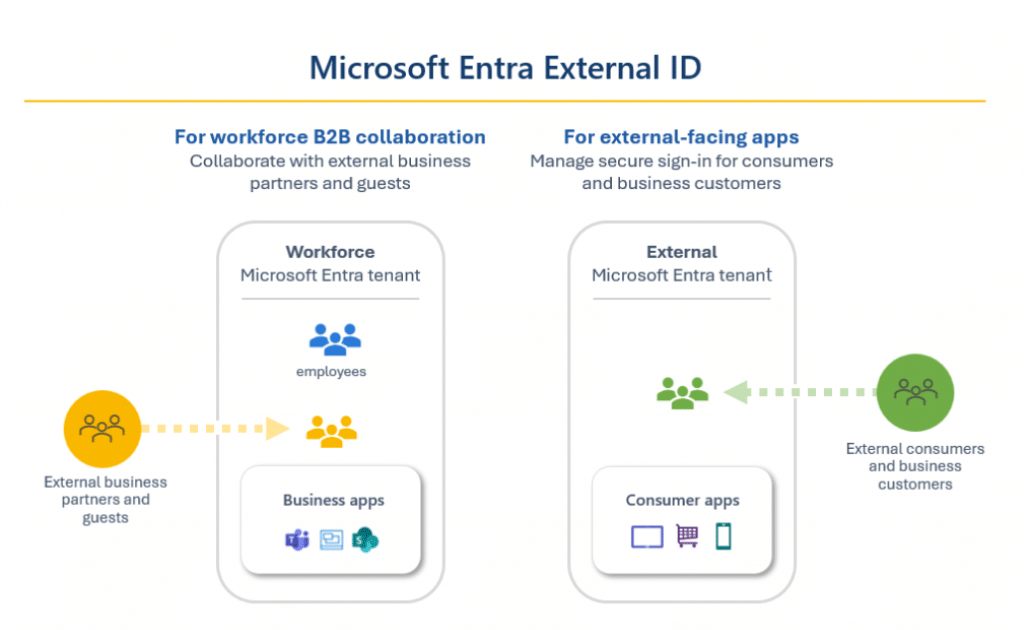
Microsoft Entra External ID brings together powerful options for collaborating with people outside of your enterprise. External ID capabilities enable external identities to safely access your apps and resources. Whether you're interacting with external partners, consumers, or corporate customers, users can bring their own identities.
Microsoft Entra External ID is a customer identification and access management (CIAM) solution that provides self-service registration, personalized sign-in experiences with social and enterprise identities, and customer account management. Because these CIAM capabilities are embedded into Microsoft Entra ID, you also get platform benefits including increased security, compliance, and scalability.
Hybrid Identity
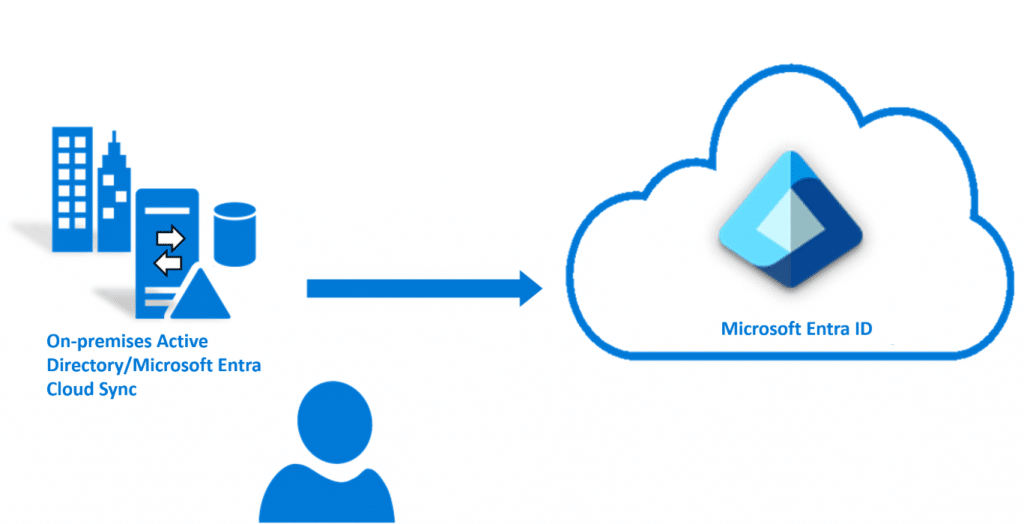
Microsoft Entra Cloud Sync is intended to meet and achieve your hybrid identity goals by provisioning and synchronizing users, groups, and contacts using Microsoft Entra ID. It accomplishes this by deploying the Microsoft Entra cloud provisioning agent. The agent offers a lightweight inter-directory provisioning experience that serves as a link between Microsoft Entra ID and Active Directory.
Authentication Capabilities of Entra ID
Multifactor Authentication (MFA)
Multifactor authentication verification prompts are set up as part of the Microsoft Entra sign-in event. Microsoft Entra ID automatically requests and executes multifactor authentication without requiring any changes to your applications or services. When a user signs in, they are prompted for multifactor authentication and can select one of the additional verification forms they have registered.
The following additional forms of verification, described in the previous unit, can be used with Microsoft Entra multifactor authentication:
- Microsoft Authenticator app
- Windows Hello for Business
- FIDO2 security key
- OATH hardware token (preview)
- OATH software token
- SMS
- Voice call
Self-Service Password Reset (SSRS)
Microsoft Entra ID's self-service password reset (SSPR) function lets users to modify or reset their passwords without the participation of an administrator or help desk.
To use self-service password reset, must be,
- Assigned a Microsoft Entra ID license (at least a Microsoft Entra ID P1 license is required for password reset)
- Enabled for SSPR by an administrator
- Registered, with the authentication methods they want to use. Two or more authentication methods are recommended in case one is unavailable
Note: When a user updates their password via self-service password reset, the change can be saved to an on-premises Active Directory. Password writeback enables users to immediately use their modified credentials with on-premises devices and applications.
Access Management Capabilities of Entra ID
Conditional Access
Conditional Access is a Microsoft Entra ID feature that adds an extra layer of security before enabling authenticated users to access data or other resources. Conditional access is implemented using policies that are generated and controlled in Microsoft Entra ID. A Conditional Access policy uses signals such as user, location, device, application, and risk to automate decisions about granting access to resources.
Some of the conditions include:
- Sign-in and User Risks: Integration with Microsoft Entra ID Protection enables Conditional Access rules to detect suspicious behaviors involving user accounts in the directory and initiate a policy. Sign-in risk refers to the likelihood that a given sign-in or authentication request is not approved by the identity owner. User risk is the possibility of a certain identity or account being compromised.
- Insider Risk: Administrators with access to Microsoft Purview adaptive protection can use risk signals from Microsoft Purview to make Conditional Access policy decisions. Insider risk is calculated using your Microsoft Purview data governance, data security, and risk and compliance parameters.
- Device Platform: Device platform, which is defined by the operating system that runs on a device, can be used to enforce Conditional Access regulations.
- Client Applications: Client apps, or the software that the user uses to access the cloud app, such as browsers, mobile apps, and desktop clients, can also be utilized to make access policy decisions.
- Filters for Devices: The filters for devices option allows organizations to impose policies based on device properties. For example, this option can be used to apply policies to specific devices, such as privileged access workstations.
Microsoft Entra Roles and Role-Based Access Control (RBAC)
Role-based access control (RBAC) refers to the process of managing access through roles. Microsoft Entra built-in and custom roles are an example of RBAC in that they control access to Microsoft Entra resources. This is known as Microsoft Entra RBAC.
Built-in Roles
- Global administrator: This position grants users access to all administrative tools in Microsoft Entra. The person who registers for the Microsoft Entra tenant automatically becomes a global administrator.
- User administrator: This job allows users to create and administer all elements of users and groups.
- Billing administrator: This job allows users to make purchases, manage subscriptions and support tickets, and monitor service health.
Custom Roles
A custom role definition is a set of permissions that you select from a predefined list. The list of permissions to choose from is the same as that of the built-in roles. The distinction is that you may choose which permissions to include in a custom role.
Custom roles require a Microsoft Entra ID P1 or P2 license.
Microsoft Entra RBAC and Azure RBAC
- Microsoft Entra RBAC - Microsoft Entra roles control access to Microsoft Entra resources such as users, groups, and applications.
- Azure RBAC - Azure roles control access to Azure resources such as virtual machines or storage using Azure Resource Management.


No comments yet. Be the first to share your thoughts!