

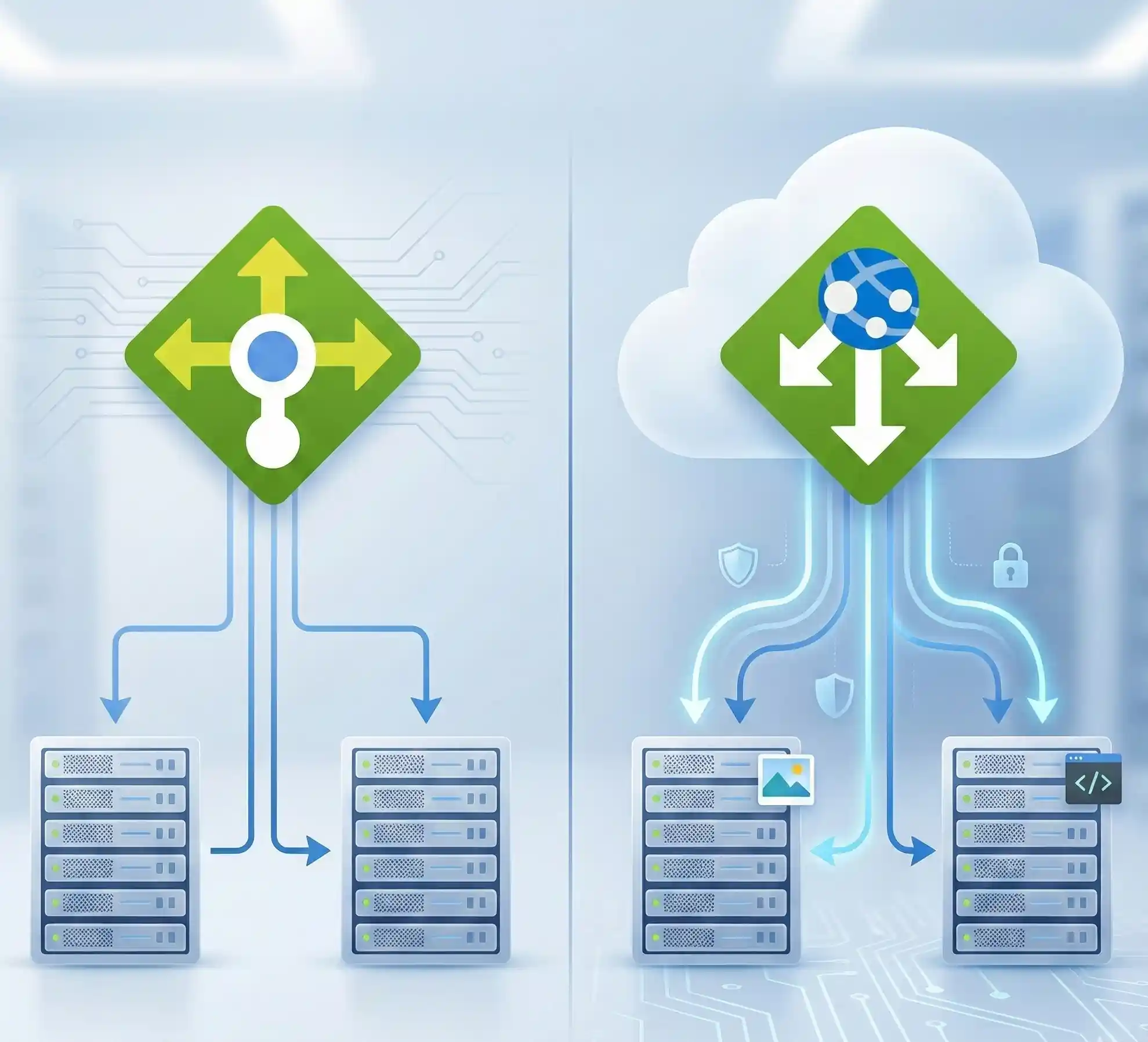
Quick Answer: Azure Load Balancer working at OSI Layer 4 (TCP/UDP) and distributes traffic based on IP addresses and ports. It's perfect for high-throughput, low-latency scenarios. Azure Application Gateway operates at Layer 7 (HTTP/HTTPS) and provides smart routing based on URLs, headers, and cookies. It also includes SSL termination and a built-in Web Application Firewall. In simply, use Load Balancer for non-HTTP workloads and simple traffic distribution. Choose Application Gateway when you need URL-based routing, WAF protection, or advanced web app features.
Introduction: Why This Decision Matters

Hey there, cloud enthusiast! If you've landed here, you're probably scratching your head over a pretty common Azure architecture dilemma. Trust me, I've been there countless times while designing cloud solutions.
Here's the main thing. Both of Azure Load Balancer and Application Gateway help distribute network traffic. But they solve very different problems. Picking the wrong one? That can lead to performance headaches, security gaps, or unnecessarily high costs. And nobody wants that.
As per my Azure infrastructure experience, I've seen teams waste weeks trying to make Load Balancer do Application Gateway's job (and vice versa). So let's break this down properly. By the end of this guide, you'll know exactly which service fits your architecture.
What is Azure Load Balancer?

Think of Azure Load Balancer as a super-efficient traffic cop at a busy intersection. It doesn't care about what's inside the vehicles (your data packets). It just makes sure traffic flows smoothly based on simple rules like source IP, destination port, and protocol.
Azure Load Balancer operates at OSI Layer 4. That means it handles TCP and UDP traffic. It's protocol-agnostic and blindingly fast. We're talking millions of requests per second with ultra-low latency.
Key Features of Azure Load Balancer
- Layer 4 (Transport Layer) operation: Routes based on IP address, port, and protocol
- High performance: This built to handle millions of requests per second
- Zone redundancy: Ensures high availability across Azure Availability Zones.(Standard tier from)
- Public and Internal options: Balance internet-facing or private VNet traffic
- Outbound connections: Translates private IPs to public IPs for outbound traffic
- Health probes: Monitors backend pool health automatically
- Global options : Can load balance traffic globally, from the nearest region.
Pro tip: The Basic Load Balancer SKU retired on September 30, 2025.
What is Azure Application Gateway?

Now, Application Gateway is a completely different beast. Imagine a smart concierge at a fancy hotel who reads every guest's reservation card, understands their preferences, and directs them to the perfect room.
Application Gateway operates at OSI Layer 7 (the application layer). It specifically handles HTTP and HTTPS traffic. This means it can peek inside each request and make intelligent routing decisions based on URLs, headers, cookies, and more.
Key Features of Azure Application Gateway
- Layer 7 (Application Layer) routing: Routes based on URL paths, host headers, query strings
- SSL/TLS termination: Offloads encryption/decryption from backend servers
- End-to-end SSL: Re-encrypts traffic to backend for compliance requirements
- Web Application Firewall (WAF): Built-in protection against OWASP top 10 vulnerabilities
- Cookie-based session affinity: Keeps users connected to the same backend server
- URL rewriting and redirection: Modify requests before they reach backends
- Autoscaling: V2 SKU automatically scales based on traffic patterns
- HTTP/2 and WebSocket support: Modern protocol support out of the box
- Private Frontend: Using this feature, you gain greater flexibility to customize the environment by using a private frontend without a public IP address. This provides enhanced security and control.
More Information's
How Does Layer 4 Load Balancing Differ from Layer 7?
This is where the magic (and confusion) happens. Let me explain it simply.
Layer 4 (Azure Load Balancer) looks at the envelope of your package. It sees the sender address, recipient address, and port number. Then it forwards the whole thing without opening it. Fast, efficient, no questions asked.
Layer 7 (Application Gateway) actually opens the package, reads the contents, and makes decisions based on what's inside. "Oh, this request is for /images? Send it to the image server pool. This one's for /api? Route it to the API backend."
Here's a real-world example. Say you have an e-commerce site with:
- Product images served from one pool
- API endpoints on another pool
- Static content from a third pool
Load Balancer? Can't help you there. It just sees port 443 traffic and distributes it randomly.
Application Gateway? Perfect fit. It reads each URL path and routes accordingly. Clean, intelligent, efficient.
Azure Load Balancer vs Application Gateway: Feature Comparison
Alright, let's get into the comparison. Here's a detailed comparison table to help you decide:
| Feature | Azure Load Balancer | Application Gateway |
| OSI Layer | Layer 4 (TCP/UDP) | Layer 7 (HTTP/HTTPS) |
| Traffic Type | Any TCP/UDP (HTTP & non-HTTP) | HTTP/HTTPS web traffic only |
| Routing Criteria | IP address, port, protocol | URL path, host header, cookies, query string |
| SSL/TLS Termination | Not supported (pass-through) | Fully supported + end-to-end SSL |
| Web Application Firewall | Not available | Built-in WAF with OWASP rules |
| Session Affinity | Hash-based (limited) | Cookie-based (sticky sessions) |
| URL-based Routing | Not supported | Path-based and host-based routing |
| Autoscaling | Scales automatically | V2 SKU autoscales |
| Typical Use Cases | VM scale sets, AKS nodes, TCP/UDP apps, databases | Web apps, APIs, microservices, WAF protection |
| Pricing Model | Rules + data processed | Gateway hours + capacity units |

When Should You Use Azure Load Balancer?
Load Balancer shines in specific scenarios. Here's when it's the right choice:
Best Use Cases for Azure Load Balancer
- Non-HTTP workloads: Database clusters (SQL Server, MySQL), FTP servers, custom TCP applications
- High-throughput scenarios: Gaming servers, streaming applications, real-time communication
- VM Scale Sets: Automatically distribute traffic across scaling VM instances
- Internal load balancing: Balance traffic between application tiers within a VNet
- Simple port-based distribution: When you don't need URL inspection or advanced routing
When Should You Choose Application Gateway?
Application Gateway is your go-to for web-centric workloads. Here's when it makes sense:
Best Use Cases for Application Gateway
- Web applications: Websites, web APIs, single-page applications
- Microservices architecture: Route /api, /auth, /users to different backend pools
- Multi-site hosting: Host multiple domains on the same gateway
- SSL offloading requirements: Reduce CPU load on backend servers by terminating SSL at the gateway
- Security-focused deployments: Built-in WAF protects against SQL injection, XSS, and other OWASP threats
- Cookie-based session persistence: Keep shopping carts or user sessions on the same backend
- URL rewriting: Modify incoming URLs before they hit your backend
Can You Use Load Balancer and Application Gateway Together?
Absolutely! And honestly? Many production architectures do exactly that. Here's how it works.
In a typical multi-tier architecture, you might have Application Gateway at the front handling web traffic with WAF protection. Behind it, internal Load Balancers distribute traffic between your application tier and database tier.
Example architecture:
- Internet traffic → Application Gateway (with WAF) → Web tier VMs
- Web tier → Internal Load Balancer → Application tier VMs
- Application tier → Internal Load Balancer → Database cluster
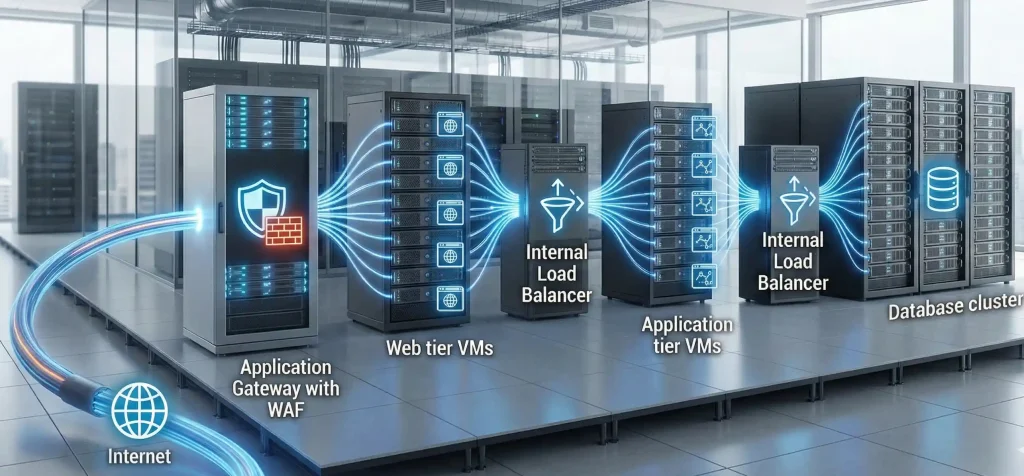
This design gives you the best of both worlds. Smart Layer 7 routing at the edge. Fast Layer 4 distribution internally.
Azure Load Balancer vs Application Gateway for AKS
Azure Kubernetes Service adds another layer to this decision. Here's what you need to know.
Azure Load Balancer with AKS: When you create a Kubernetes Service of type LoadBalancer, AKS automatically provisions an Azure Load Balancer. It's great for exposing non-HTTP services or when you need simple Layer 4 access to your pods.
Application Gateway Ingress Controller (AGIC): This is where things get interesting. AGIC lets you use Application Gateway as your Kubernetes ingress controller. It runs as a pod in your cluster and automatically configures the Application Gateway based on your Ingress resources.
Benefits of AGIC for AKS
- No need for additional in-cluster load balancers
- Reduced hops in the data path (better performance)
- Built-in WAF protection for your containerized apps
- Native Azure integration and support
- Zone redundancy and autoscaling capabilities
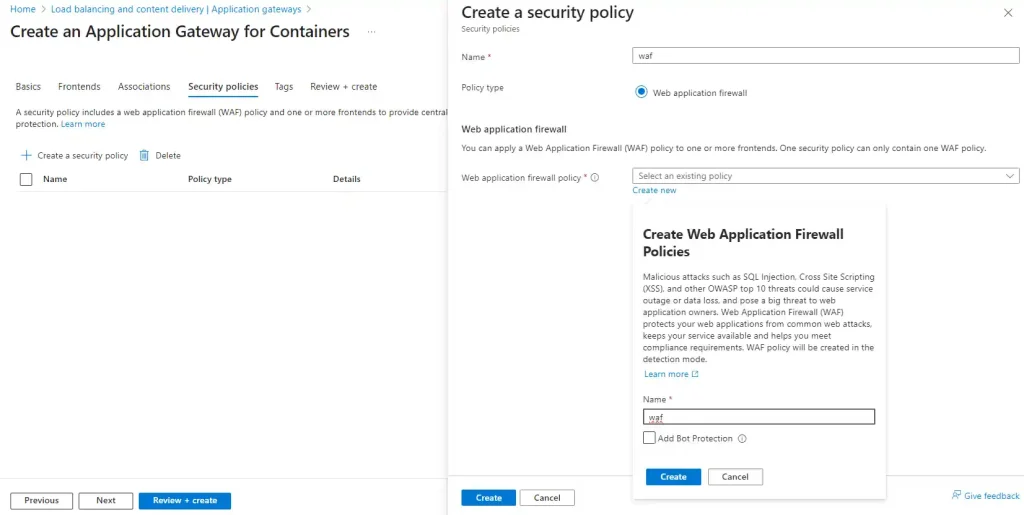
Update: Application Gateway for Containers with WAF is now generally available. It's the evolution of AGIC and uses the newer Kubernetes Gateway API. Definitely worth evaluating for new deployments!
Application Gateway WAF: What Does It Protect Against?

The Web Application Firewall on Application Gateway is seriously powerful. It uses OWASP Core Rule Set (CRS) to protect against common web vulnerabilities.
Protection Capabilities
- SQL Injection attacks: Blocks attempts to inject malicious SQL code
- Cross-Site Scripting (XSS): Prevents injection of malicious scripts
- Command injection: Stops OS-level command execution attempts
- HTTP request smuggling: Detects request splitting attacks
- Remote file inclusion: Blocks external file execution attempts
- Protocol violations: Enforces HTTP protocol compliance
You can run WAF in Detection mode (logs threats but doesn't block) or Prevention mode (actively blocks malicious requests). Most teams start with Detection mode to tune rules before enabling Prevention.
How SSL/TLS Termination Works on Application Gateway
SSL termination is one of Application Gateway's killer features. Here's how it benefits your architecture.
When clients connect via HTTPS, Application Gateway handles the SSL handshake and decryption. Your backend servers receive unencrypted HTTP traffic, saving them CPU cycles.
SSL Options on Application Gateway
- SSL Termination: Gateway decrypts traffic, forwards HTTP to backends
- End-to-End SSL: Gateway decrypts, inspects, then re-encrypts before sending to backends
- SSL Policy: Control cipher suites and TLS versions for compliance
End-to-end SSL is essential for compliance-heavy industries like healthcare and finance. It ensures data remains encrypted throughout the entire journey.
Pricing Comparison: Load Balancer vs Application Gateway

Let's talk money. Cost considerations vary significantly between these services.
Azure Load Balancer Pricing
- Standard Load Balancer: Charged per rule and data processed
- Generally more cost-effective for high-throughput scenarios
- No upfront costs, pay-as-you-go model
Application Gateway Pricing
- V2 SKU: Fixed hourly cost plus capacity unit charges
- WAF adds additional cost but includes policy and rules at no extra charge
- Can be more expensive for simple use cases, but cost-effective when you factor in WAF and routing features
Cost tip: If you're running Application Gateway just for basic load balancing without using WAF or URL routing, you're probably overpaying. Switch to Load Balancer instead!
Monitoring and Diagnostics: What Logging Options Exist?
Both services integrate with Azure Monitor, but offer different levels of visibility.
Azure Load Balancer Monitoring
- Health probe status monitoring
- Data path availability metrics
- Packet and byte counters
- Connection success/failure rates
Application Gateway Monitoring
- Access logs with full HTTP request details
- Performance logs showing backend latency
- WAF logs with threat intelligence
- Firewall logs for WAF rule triggers
- Integration with Microsoft Defender for Cloud
Decision Framework: How to Choose
Still not sure which one to pick? Here's a simple decision framework I use with my clients all times.
Ask yourself these questions:
1. Is your traffic HTTP/HTTPS only?
Yes → Application Gateway is a strong candidate
No (TCP/UDP/other) → Load Balancer is your only option
2. Do you need URL-based or host-based routing?
Yes → Application Gateway
No → Either could work
3. Is WAF protection important?
Yes → Application Gateway with WAF SKU
No → Consider cost differences
4. Do you need SSL termination to offload CPU from backends?
Yes → Application Gateway
No → Load Balancer can pass through SSL
5. Is cost the primary concern and you don't need advanced features?
Yes → Load Balancer
No → Evaluate total cost of ownership including security features
Frequently Asked Questions
1. What are the main differences between Azure Load Balancer and Azure Application Gateway?
Azure Load Balancer operates at Layer 4 (TCP/UDP) and routes traffic based on IP and port. Application Gateway works at Layer 7 (HTTP/HTTPS) with URL-based routing, SSL termination, and WAF. Use Load Balancer for non-HTTP workloads; choose Application Gateway for web apps.
2. When should Azure Load Balancer be used instead of Application Gateway?
Use Azure Load Balancer when you need to balance non-HTTP traffic (databases, custom TCP apps), require ultra-low latency, or don't need advanced features like URL routing or WAF. It's also more cost-effective for simple load balancing scenarios.
3. When is Application Gateway better for web applications?
Application Gateway excels when you need URL-based routing, host-based routing, SSL termination, cookie-based session affinity, or WAF protection. It's ideal for microservices, multi-site hosting, and any web application requiring intelligent Layer 7 routing.
4. Can Azure Load Balancer and Application Gateway be used together?
Yes! Many architectures use Application Gateway at the internet edge for web traffic with WAF, while internal Load Balancers distribute traffic between application tiers. This gives you smart routing externally and fast Layer 4 balancing internally.
5. Does Application Gateway support Web Application Firewall?
Yes. Application Gateway's WAF SKU provides built-in protection using OWASP Core Rule Set. It defends against SQL injection, cross-site scripting, command injection, and other web vulnerabilities. You can run it in Detection or Prevention mode.
6. How does SSL/TLS termination work on Application Gateway?
Application Gateway handles the SSL handshake and decryption at the gateway level. This offloads CPU-intensive encryption work from your backends. You can also configure end-to-end SSL to re-encrypt traffic before sending to backends for compliance requirements.
7. What are the use cases for URL-based and host-based routing?
URL-based routing sends /images to image servers and /api to API servers. Host-based routing directs api.convertsoon.com to one pool and www.convertsoon.com to another. Both are essential for microservices and multi-tenant applications.
8. How do pricing and costs differ between the two services?
Load Balancer charges per rule and data processed, making it economical for simple scenarios. Application Gateway has fixed hourly costs plus capacity unit charges. Application Gateway costs more but includes advanced features like WAF and intelligent routing.
9. Which service should front an AKS cluster?
For HTTP/HTTPS workloads, Application Gateway with AGIC provides Layer 7 routing and WAF. For non-HTTP services, use Azure Load Balancer. Many production clusters use both: Application Gateway for web ingress and Load Balancer for internal/non-HTTP services.
10. What logging options are available for each service?
Load Balancer offers health probe status, data path metrics, and connection counters via Azure Monitor. Application Gateway provides richer logging with access logs, performance logs, WAF threat logs, and integration with Microsoft Defender for Cloud.
11. How does session affinity differ between the services?
Load Balancer uses hash-based distribution with limited affinity options. Application Gateway offers cookie-based session affinity (sticky sessions), ensuring subsequent requests from the same client go to the same backend server. This is crucial for stateful applications.
12. How do autoscaling and high availability work for each service?
Load Balancer automatically scales with no configuration needed and is zone-redundant by default. Application Gateway V2 supports autoscaling based on traffic load and can be deployed across availability zones for high availability.
13. Can Application Gateway perform end-to-end SSL encryption?
Yes. While SSL termination decrypts at the gateway, end-to-end SSL re-encrypts traffic before forwarding to backends. This satisfies compliance requirements that mandate encryption throughout the entire data path.
14. What is Application Gateway for Containers?
Application Gateway for Containers is the evolution of AGIC, offering native container workload balancing using Kubernetes Gateway API. It provides modern application load balancing with enhanced flexibility and is recommended for new AKS deployments in 2025.
Conclusion: Making Your Decision

We've covered a lot of ground here. Let me wrap it up with the key takeaways.
Choose Azure Load Balancer when: You're dealing with non-HTTP workloads, need ultra-low latency, want the most cost-effective option, or require simple port-based traffic distribution.
Choose Azure Application Gateway when: You're running web applications, need URL-based routing, want WAF protection, require SSL termination, or building microservices architectures.
Use both together when: You have multi-tier applications that benefit from intelligent Layer 7 routing at the edge and fast Layer 4 distribution internally.
The cloud is all about using the right tool for the job. Now you've got the knowledge to make that call confidently.
What’s next? Ready to implement?
Start by exploring the Azure portal’s built-in “Load balancing – help me choose” tool to select the right option for your workload. As you design and deploy, don’t forget to align your architecture with Azure Landing Zones—including networking, identity, security, governance, and scalability best practices.
If you found this guide useful, share it with your team. Have questions or real-world scenarios to discuss? Drop them in the comments below.
Written with insights from hands-on Azure infrastructure experience. Last updated: December 2025.


No comments yet. Be the first to share your thoughts!