


Direct Answer: Yes...You can host a static website on Azure for $0/month by using the Azure Static Web Apps free tier, which connects directly to your GitHub repository. It automatically builds and deploys your code (like React, Vue, or HTML) with GitHub Actions whenever you push changes, providing free SSL certificates and global hosting without any hidden costs. This service is perfect for students and developers who want professional features without the price tag.
Introduction

Who actually likes paying for web hosting? I definitely don’t. If you are a student or a developer just starting out, saving money is remarkably important.
Imagine hosting your portfolio or a cool project completely for free. No credit card charges, no surprise bills. Sounds like a dream, right? Well, with Azure Static Web Apps, it is real. As per my Cloud experience, this is one of the best ways to get your site online quickly.
In this guide, I will show you exactly how to do it. We will look at how to deploy your site, set up a custom domain, and keep everything running smoothly. Let’s dive in.
What is Azure Static Web Apps?
Think of Azure Static Web Apps as a bridge between your code and the internet. It is a service specifically designed to host static content—like HTML, CSS, JavaScript, and images—along with modern frontend frameworks.
Whether you are using React, Vue.js, Angular, or even static site generators like Hugo and Jekyll, Azure handles it all. The best part? It talks directly to your GitHub. When you update your code there, Azure sees it and updates your website automatically. It is called CI/CD pipeline setup, and it saves you so much time.
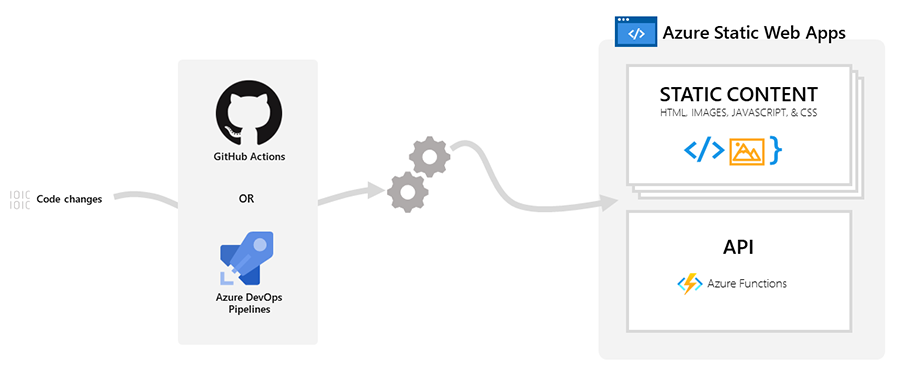
Image Source : https://learn.microsoft.com/en-us/azure/static-web-apps/overview
Why Should You Choose Azure Static Web Apps?
You might be wondering, "Why Azure? Why not others?" That is a great question.
First off, the Free Tier is incredibly generous. You get free web hosting, free SSL certificates (for security), and free global distribution. This means your website loads fast for everyone, everywhere.
Here is a quick comparison to help you decide:
| Feature | Azure Static Web Apps (Free Tier) | Traditional Hosting |
| Cost | $0/Month | Usually $5 - $10/Month |
| SSL Certificate | Included (Free) | Often extra cost |
| Bandwidth | Generous limits | Often limited |
| Deployment | Automatic (GitHub) | Manual upload (FTP) |
| Custom Domains | Supported | Supported |
As you can see, Azure gives you premium features without the premium price.
How to Deploy a Static Website on Azure in 10 Minutes?
Ready to get your hands dirty? Don’t worry, it is super simple. Follow these steps.
1. Prepare Your Code Make sure your website code is on GitHub. Azure supports many frameworks. If you are using Next.js, Gatsby, or Nuxt.js, you are good to go. Even a simple index.html file works perfectly.
2. Create a Static Web App Resource
- Log in to your Azure Portal.
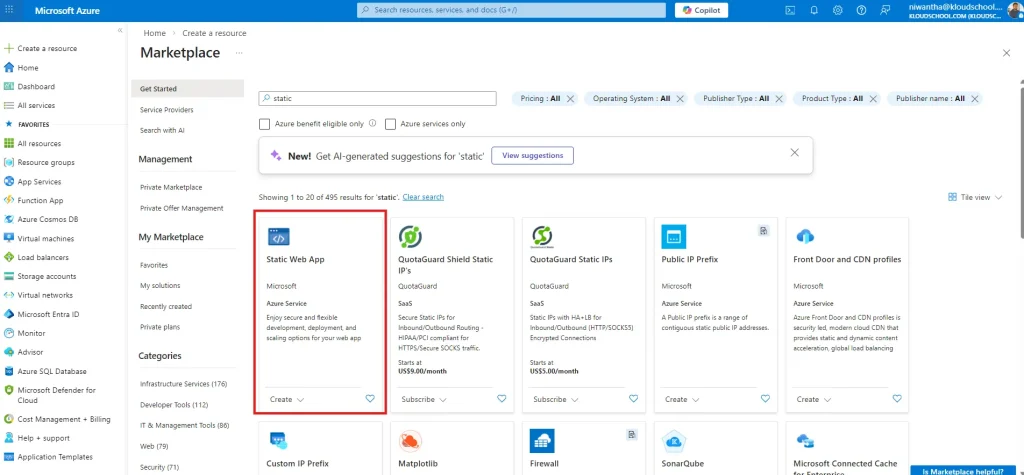
- Search for "Static Web Apps" and click "Create".
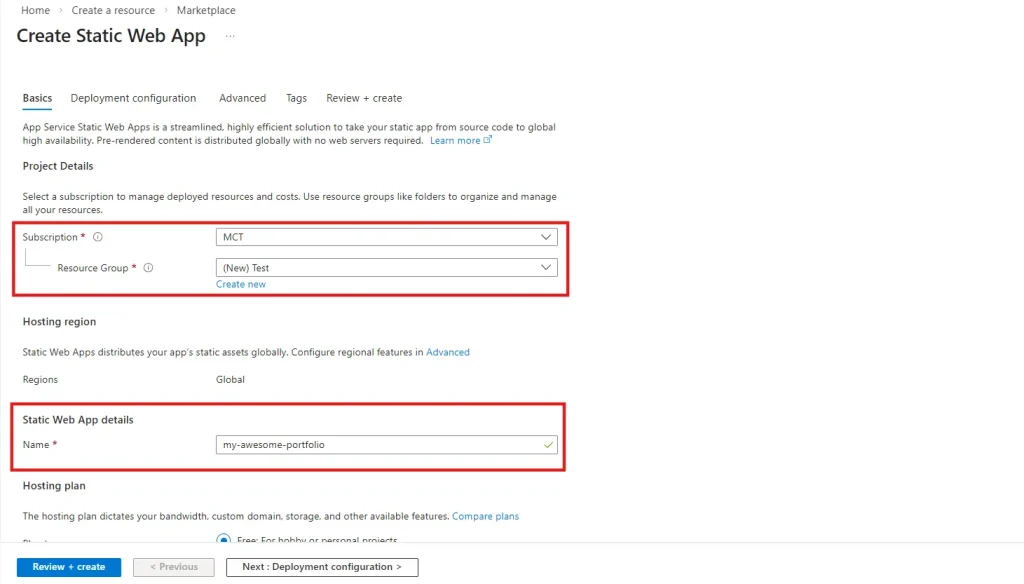
- Select your subscription and resource group.
- Name your app (e.g., "my-awesome-portfolio").
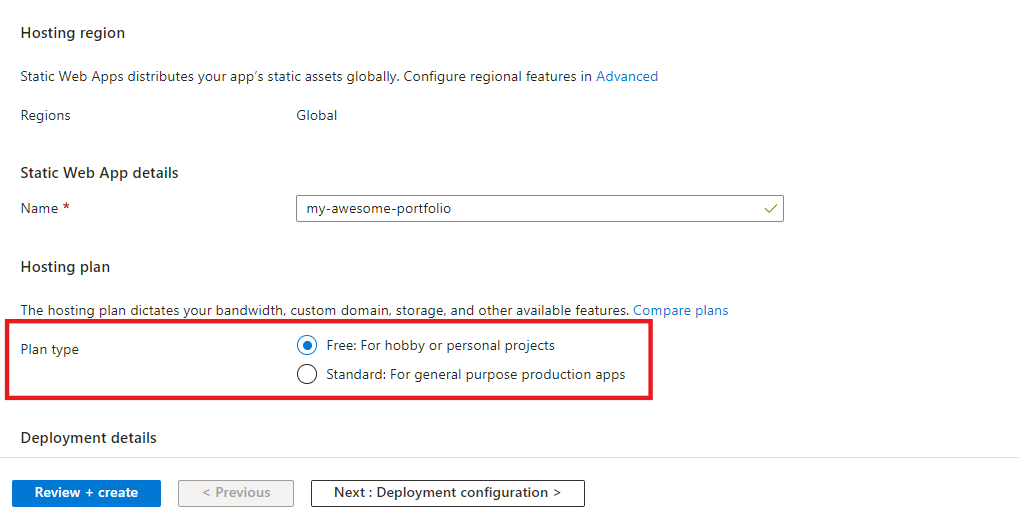
- Crucial Step: Select the "Free" plan under Azure Static Web Apps pricing.
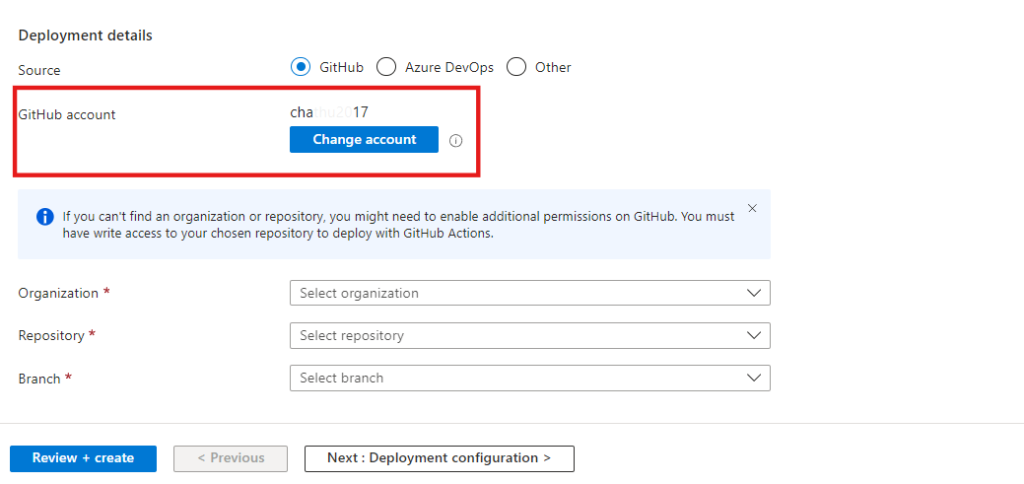
3. Connect to GitHub
- Click "Sign in with GitHub".
- Select your repository and the branch you want to deploy (usually
mainormaster).
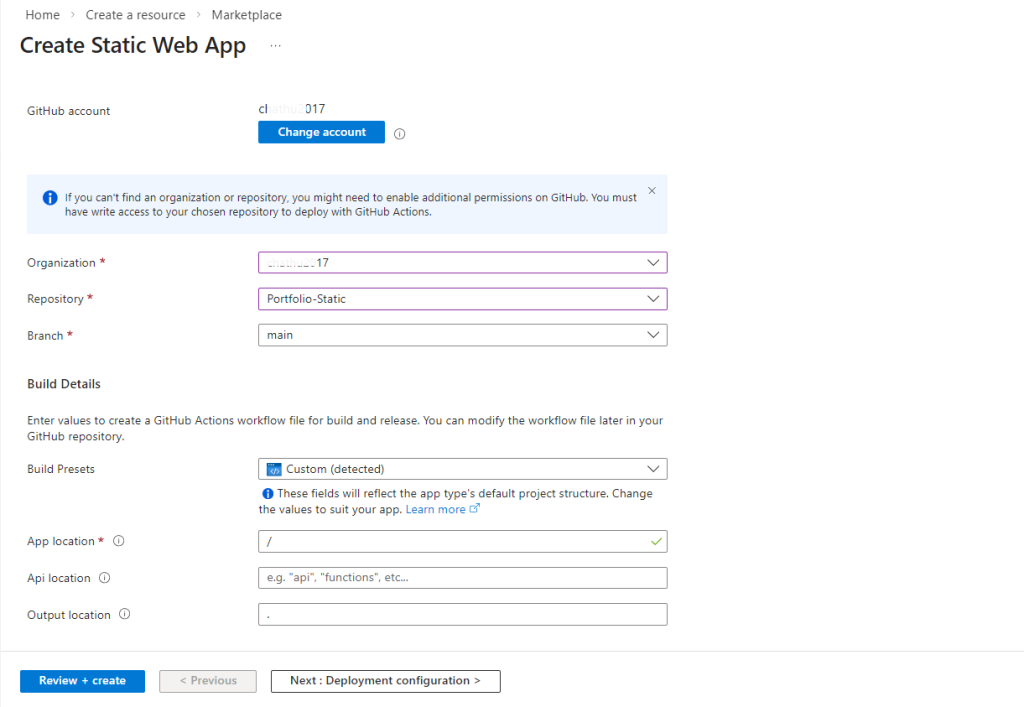
4. Configure Build Presets
Azure is smart. It usually detects your framework automatically.
- If you are using React, select "React".
- If you are using Vue, select "Vue.js".
- If it is just HTML, select "Custom".
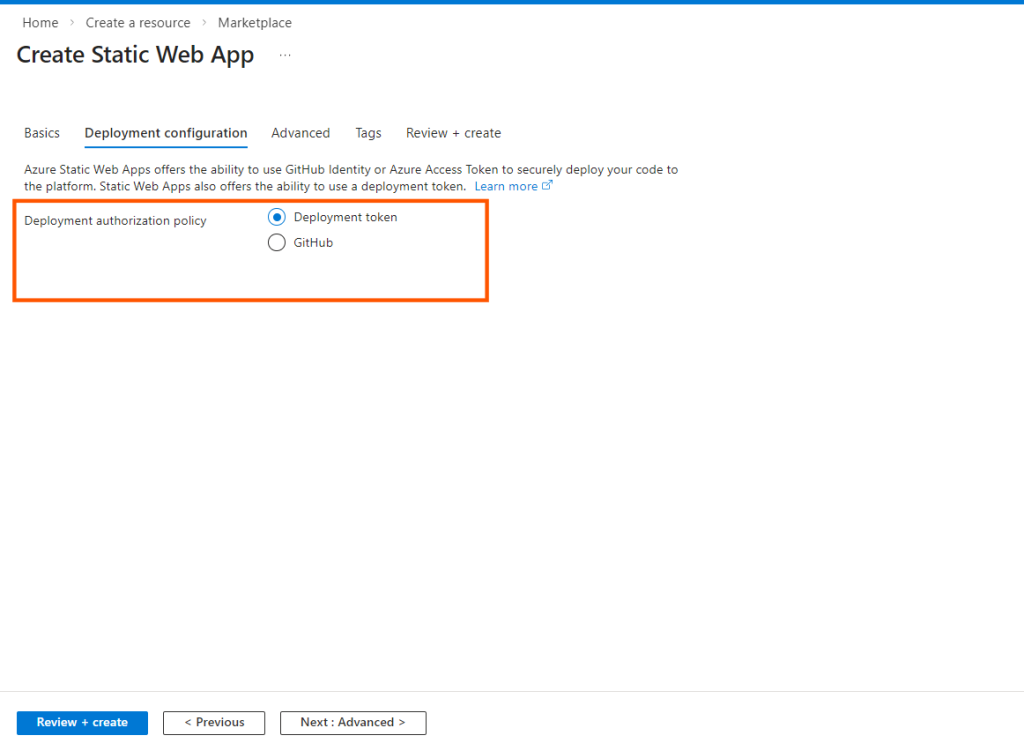
4. Deployment configuration
Click Deployment Token Method.
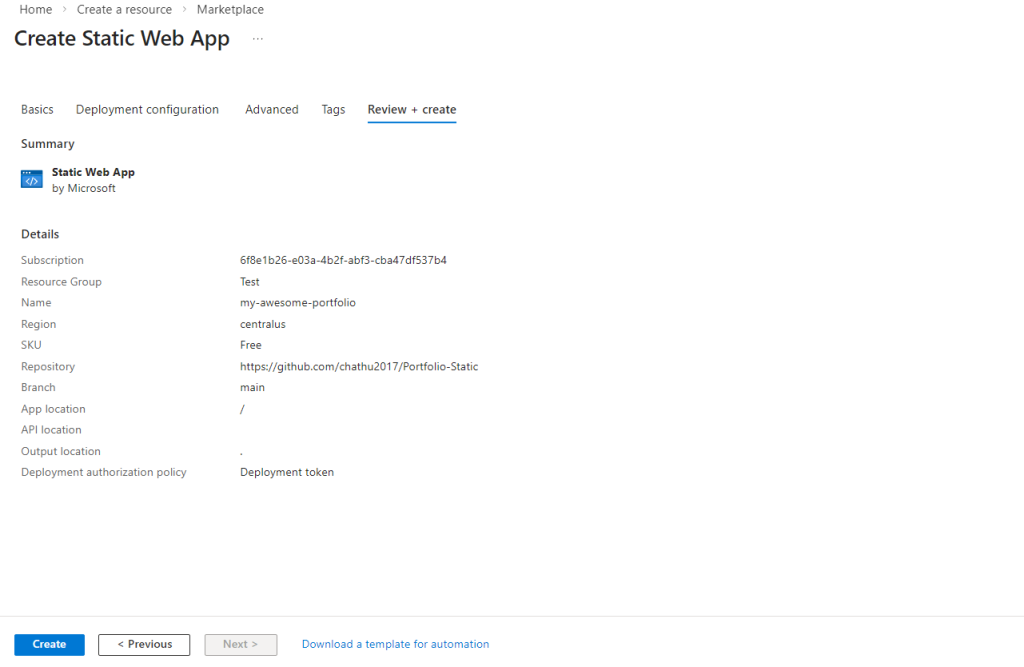
4. Review and Create
Click "Review + create". Azure will now set up the GitHub Actions for you. Wait a few minutes, and boom! Your site is live.
How to Configure a Custom Domain?
You probably don’t want a long, messy URL. You want yourname.com.
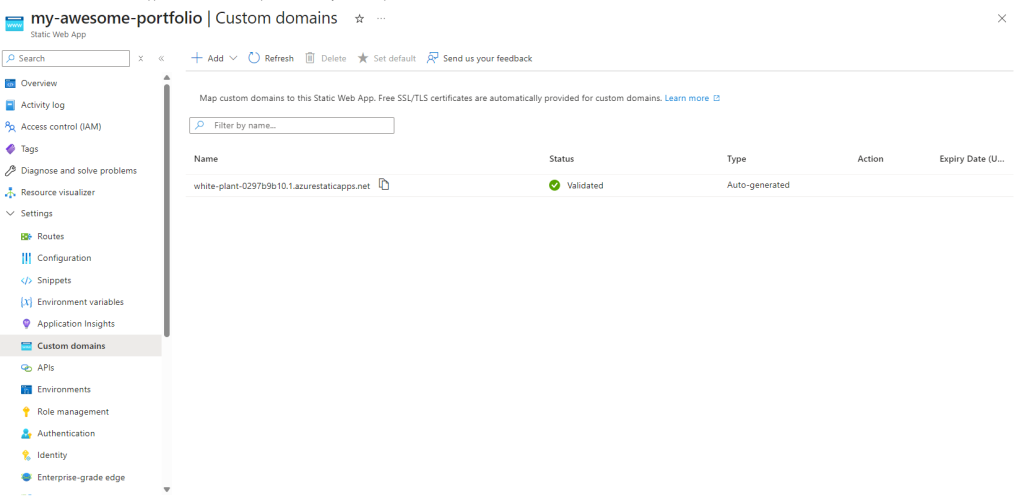
Setting this up is easy.
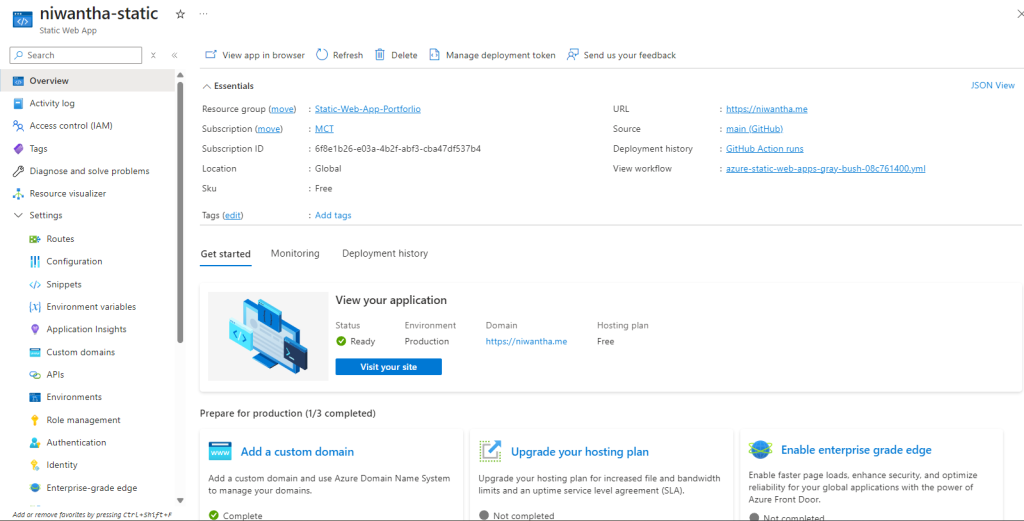
- Go to your Static Web App in the Azure Portal.
- Click on "Custom domains".
- Add your domain name.(If you have already purchased domain from other vendor , Then Select "Custom domain on other DNS" Option)
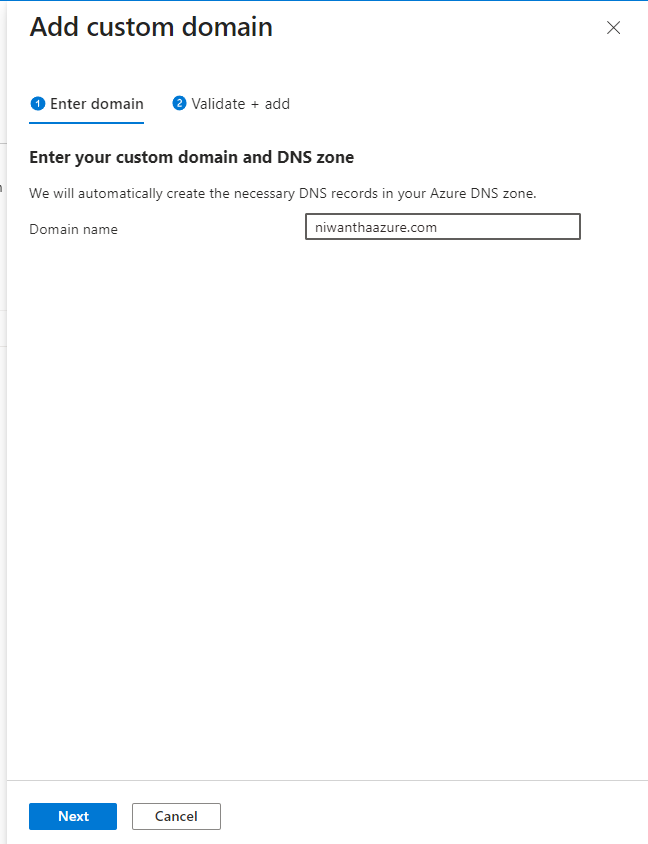
- Also Azure will give you some DNS records to add to your domain provider (like GoDaddy or Namecheap).
- Then Clicked Next Button.
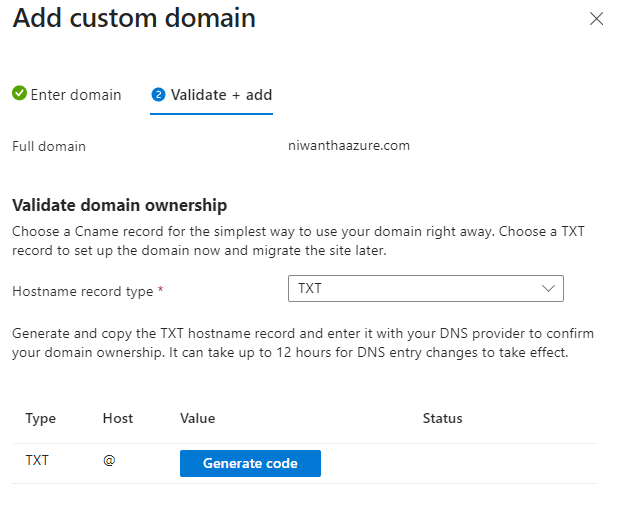
Note : In this Step you have to generate txt code and place it on your custom domain manage DNS field. And Also you need get CNAME records also.
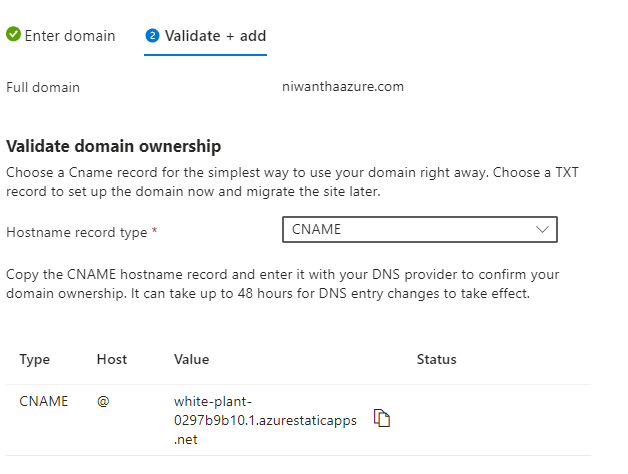
- Once verified, Azure automatically provisions a free SSL certificate for you.
Now your site looks professional and secure.
What About Dynamic Features and APIs?
Static sites are great, but sometimes you need backend logic. Maybe a contact form or a login system?
Azure has you covered. You can integrate Azure Functions directly into your static app. This creates a "serverless" backend. You don’t need to manage a server; you just write the code.
- Managed Functions: Azure manages them for you.
- Bring Your Own: If you have an existing Function App, you can link it.
This is perfect for building APIs or handling authentication.
Top Tools for Development
To make your life easier, I recommend using these tools. They speed up your workflow significantly.
- VS Code Extension: Managing your app directly from your editor is a game-changer.
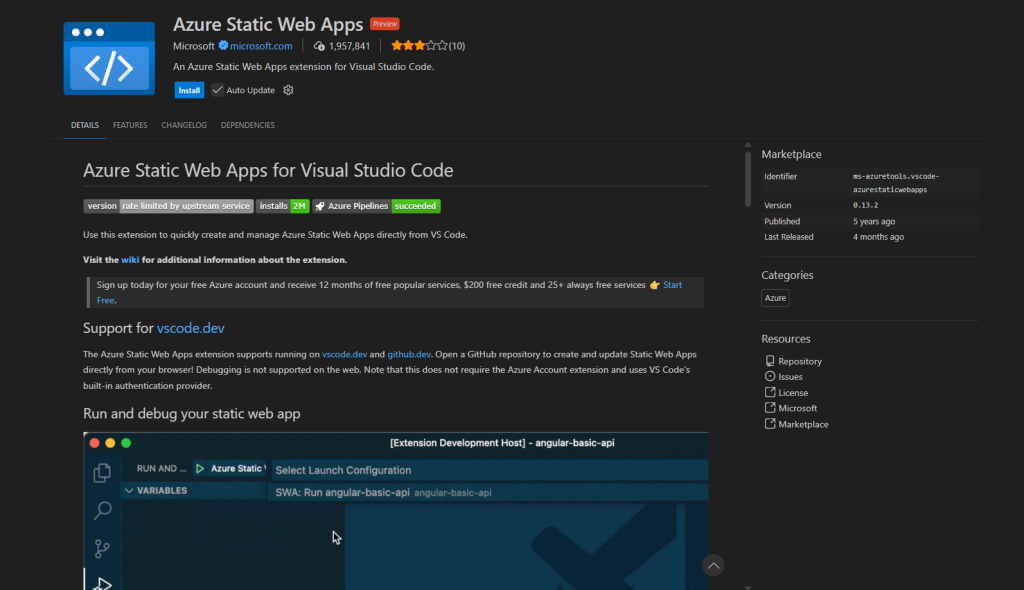
- Azure Static Web Apps CLI (SWA CLI): This lets you run and test your app locally before you push it to GitHub. It mimics the Azure environment on your laptop.
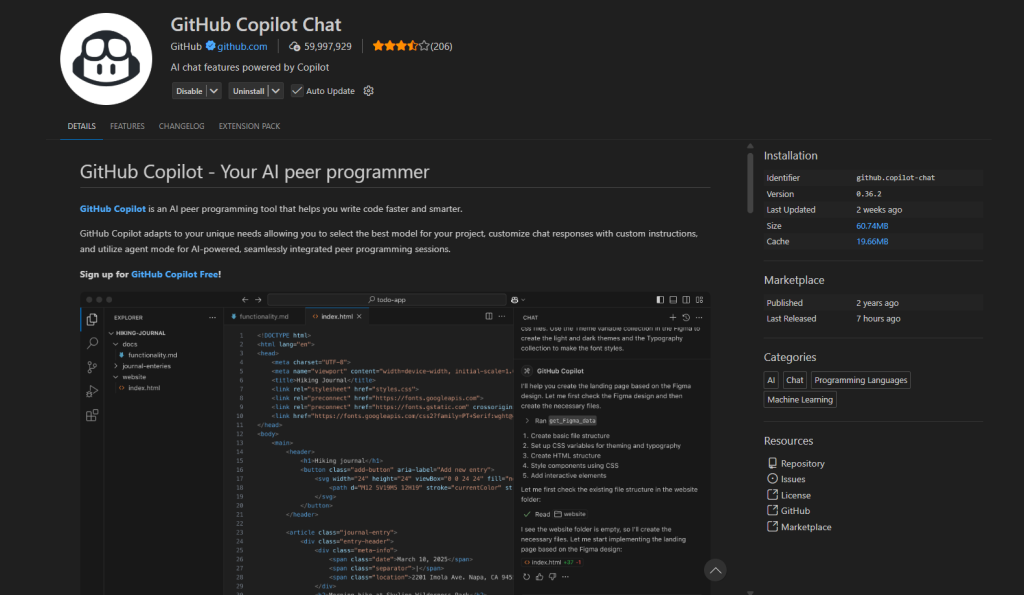
- GitHub Copilot: Stuck on code? Use AI to help you write deployment workflows.
Frequently Asked Questions (FAQs)
1. What frontend frameworks can be automatically built by Static Web Apps? Azure supports almost all popular frameworks. This includes React, Vue.js, Angular, Blazor, Next.js, Nuxt.js, Gatsby, Hugo, Jekyll, and Eleventy.
2. How do I develop and test my static web app locally without deploying? You can use the Azure Static Web Apps CLI (SWA CLI) or the Visual Studio Code extension. These tools let you run the site on your machine just like it would run on the cloud.
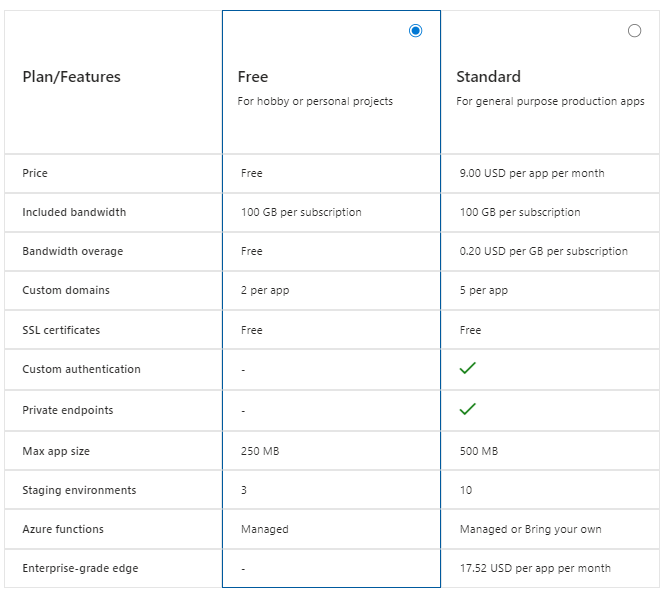
3. What are the limitations of the Free plan vs Standard plan? The Free plan is great for hobbies and personal sites. The Standard plan offers more bandwidth, a higher Service Level Agreement (SLA), and enterprise features. However, for most personal projects, the Free plan limits are very generous.
4. Why does my static web app return a 404 error when accessing existing routes? This usually happens with Single Page Applications (SPAs) like React. You need to configure a fallback route in your settings so the browser knows to load index.html for all paths.
For this issue create a staticwebapp.config.json file in the root of your application's deployment folder and add a navigationFallback section.This configuration ensures that client-side routing works correctly for Single Page Applications (SPAs) like React, Angular, or Vue.js, preventing 404 errors when a user refreshes the page or navigates directly to a client-only route.
Example staticwebapp.config.json
{
    "navigationFallback": {
       "rewrite": "/index.html"
    }
}
5. Can I use a custom domain with SSL for free? Yes! Azure provides automatic free TLS/SSL certificate provisioning when you set up a custom domain. You do not need to pay extra for security.
6. Does Azure Static Web Apps support compression? Yes, it automatically uses Gzip or Brotli compression for HTML, CSS, and JavaScript files to make your site load faster.
7. How can I restrict access to specific routes based on user roles?
You can secure routes by adding an allowedRoles array to your routing configuration rule. This allows you to restrict access to users with built-in roles (such as authenticated for logged-in users) or custom roles (such as administrator) assigned via invitations.
Important: Routing rules only secure HTTP requests served by Azure Static Web Apps. They do not secure client-side routing (common in front-end frameworks). You must ensure your API validates the user's identity before returning sensitive data.
8. Does Azure Static Web Apps support restricting access to specific IP addresses?
Yes, you can restrict access by specifying a list of allowed IPv4 address blocks in the allowedIpRanges property of the networking configuration. You must define these blocks using Classless Inter-Domain Routing (CIDR) notation (e.g., use /32 to allow a single IP).
{
    "networking": {
         "allowedIpRanges": [
                  "10.0.0.0/24",
                  "100.0.0.0/32",
                  "192.168.100.0/22"
             ]
        }
}
Note: Networking configuration, including IP restrictions, is only available in the Azure Static Web Apps Standard plan.
8. How do I configure Azure Static Web Apps to work correctly behind a forwarding gateway (like a CDN or Azure Front Door)?
You must configure the forwardingGateway section by adding domains to the allowedForwardedHosts list. This ensures that when the gateway sends the X-Forwarded-Host header, the Static Web App uses that value to construct correct redirect URLs (such as those used after a successful sign-in).
Note: Forwarding gateway configuration is only available in the Azure Static Web Apps Standard plan.
Conclusion
Hosting a website doesn't have to be expensive or complicated. With Azure Static Web Apps, you get a professional, secure, and fast hosting solution for exactly $0/month.
As we discussed, you get CI/CD integration, SSL, and global reach without spending a dime. Whether you are deploying a React app or a simple Jekyll blog, this is the way to go.
So, what are you waiting for? Go build something amazing and share it with the world!
My Examples Of Using Static Web Apps: https://niwantha.me







No comments yet. Be the first to share your thoughts!