


Quick Answer: Azure Virtual Networks (VNets) create your private network space in Azure, while Network Security Groups (NSGs) act as virtual simple firewalls that filter traffic going in and out of that network. VNets give you the infrastructure, NSGs give you the security rules(Controllability). Together, they let you build isolated networks and control exactly what traffic can reach your resources.
Think of it like this: VNet is your gated building, and NSG is the security guard checking who gets in and out.
Introduction: Why Network Security Matters in Azure

So you've planning to move your workloads to Azure. Smart move! But here's the thing—the cloud isn't magically secure just because it's "in the cloud." You still need to think about who can access what, and how traffic flows between your resources.
That's where Azure Virtual Networks and Network Security Groups come into scene. As someone who has spent years working with Azure infrastructure, I can tell you these two services are absolutely fundamental. They're not wonderful, but they're the backbone of any secure Azure deployment.
In this zero to hero guide, I'll walk you through everything you need to know. We'll cover what VNets and NSGs actually do, how they work together, and real-world scenarios where you'll use them. By the end, you'll have a solid foundation for designing secure Azure networks.

What Is an Azure Virtual Network (VNet)?
An Azure Virtual Network is basically your private network in the Azure cloud. It's the foundation that allows your Azure resources—like virtual machines, databases, and web apps—to communicate securely with each other with privately, Connected with the internet, and even your on-premises networks.
Here's what makes VNets so useful:
- Isolation: Your resources are isolated from other Azure customers. It's your own private space.
- Custom IP addressing: You define your own IP address ranges using CIDR notation (like 192.168.0.0/16).
- Subnets: Divide your VNet into smaller segments for better organization and security.
- Connectivity options: Connect to other VNets (peering), on-premises networks (VPN Tunnels/ExpressRoute), or the internet.
When you create a VNet, you're essentially creating a software-defined network. It's like setting up a traditional on-premises network, but without the physical hardware headaches. You get all the benefits—scalability, availability, and isolation—without managing routers and switches.
What Is a Network Security Group (NSG)?
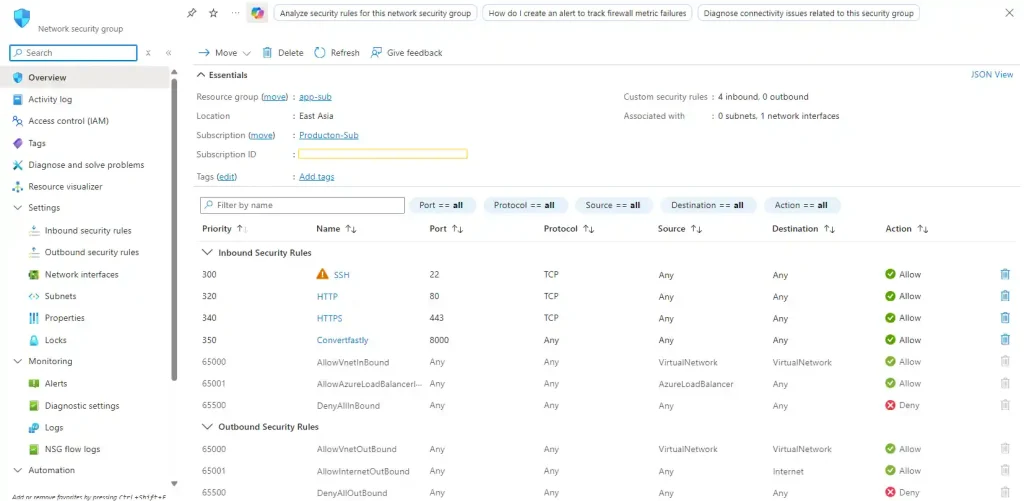
A Network Security Group is Azure's built-in Basic firewall for filtering network traffic. It contains a list of security rules that allow or deny inbound and outbound traffic based on source, destination, port, and protocol.
NSGs operate at OSI Layers 3 and 4, meaning they work with IP addresses, ports, and protocols. They're stateful too, which is important—if you allow inbound traffic, the response traffic is automatically allowed without needing a separate rule.
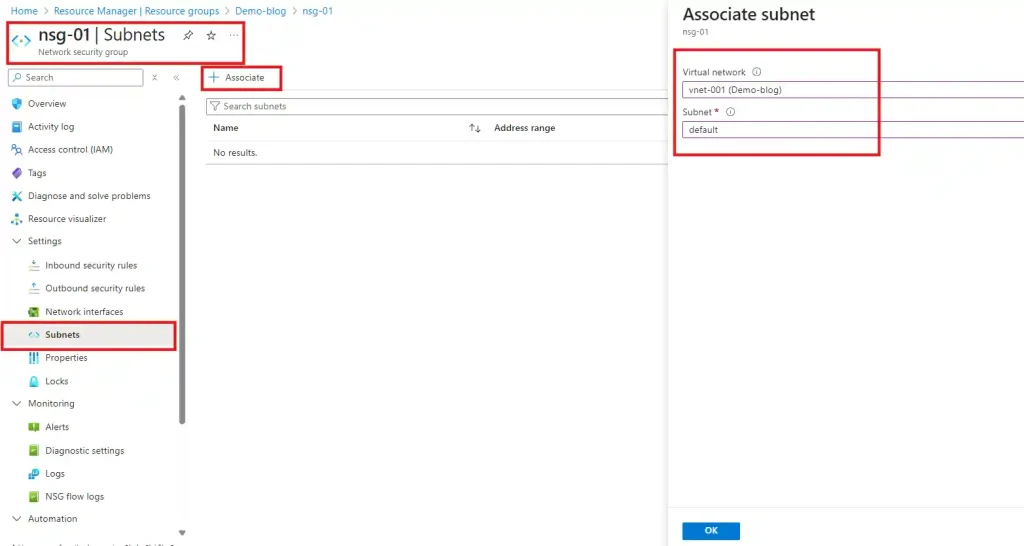
You can associate NSGs with:
- Subnets: All resources in that subnet inherit the NSG rules.
- Network interfaces (NICs): Rules apply to a specific VM's network interface.
How Do VNets and NSGs Work Together?
This is where things get interesting. VNets provide the network infrastructure—the roads and highways. NSGs act as the traffic cops, controlling what can travel on those roads.
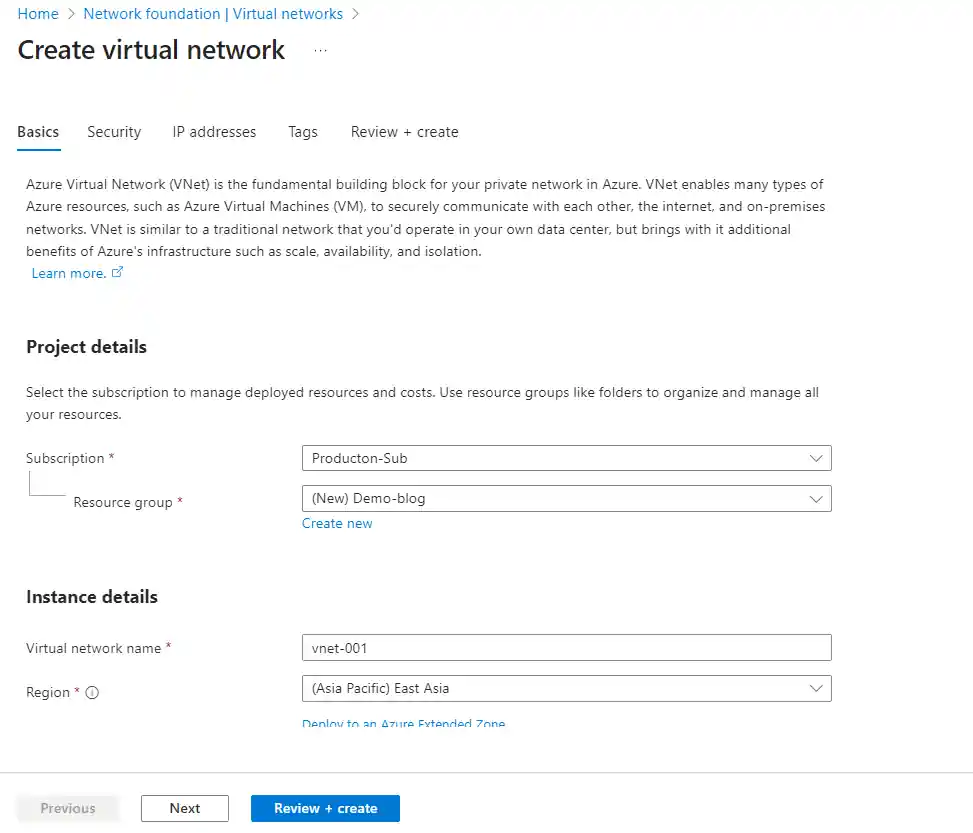
Here's the typical flow:
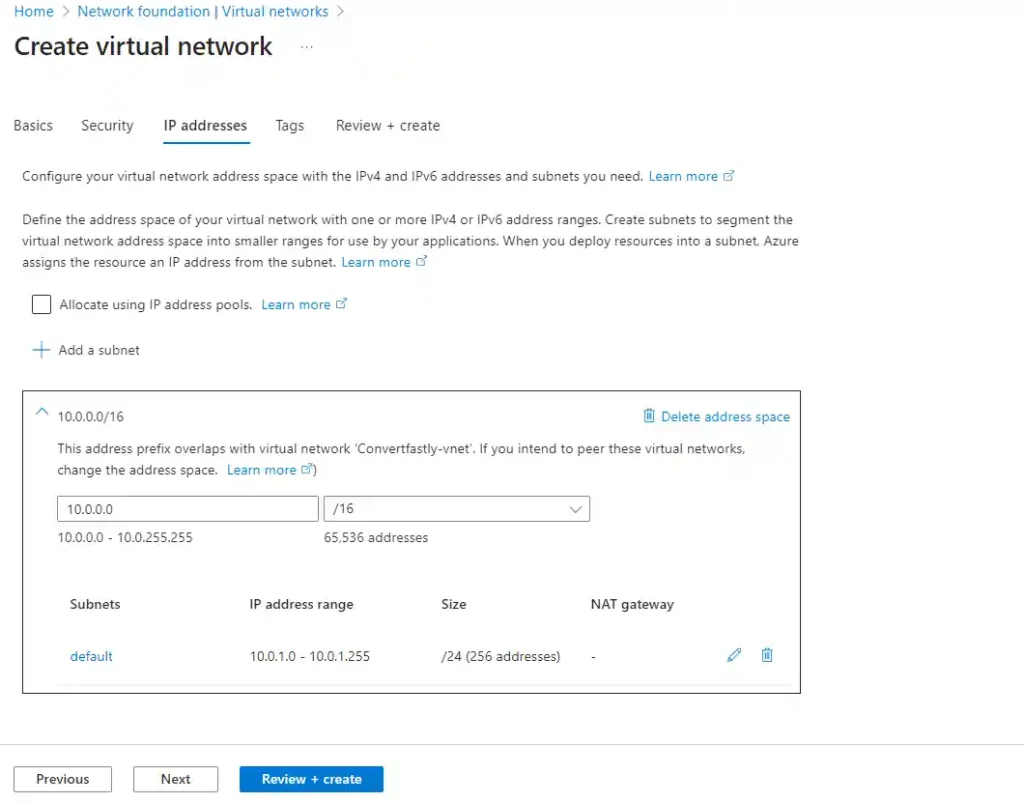
- Create a VNet with a defined address space (e.g., 10.0.0.0/16).
- Create subnets within the VNet (e.g., web-subnet at 10.0.1.0/24, db-subnet at 10.0.2.0/24).
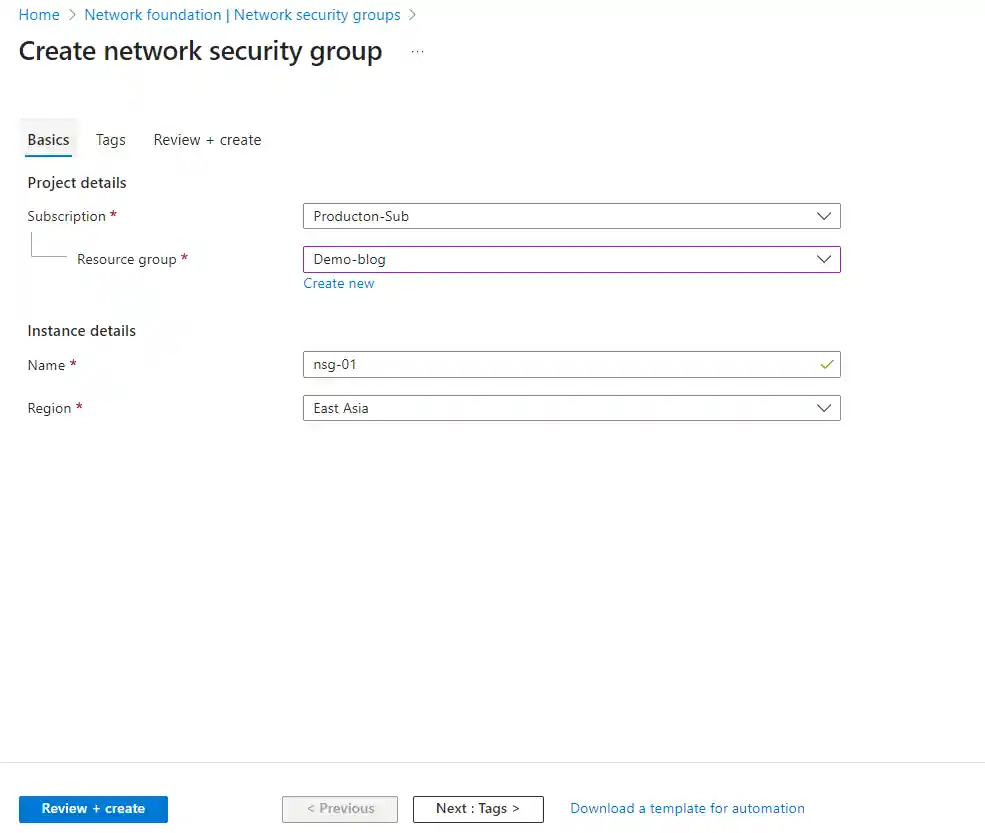
- Create NSGs with rules specific to each subnet's requirements.
- Associate NSGs with subnets and/or NICs.
- Deploy resources and traffic is automatically filtered.
Traffic Flow: Inbound vs Outbound
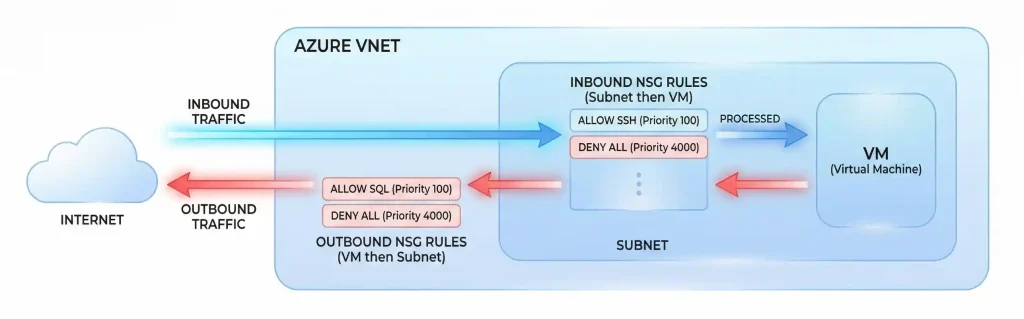
Understanding how traffic flows through NSGs is crucial. Let me break it down:
For inbound traffic:
Traffic hits the subnet-level NSG first. If allowed, it then hits the NIC-level NSG (if one exists). Both must allow the traffic for it to reach the VM.
For outbound traffic:
It's the opposite order. Traffic goes through the NIC-level NSG first, then the subnet-level NSG. Again, both must allow it.
How Are NSG Rules Processed and Prioritized?
NSG rules are evaluated based on a 5-tuple hash: source IP, source port, destination IP, destination port, and protocol. Rules are processed in priority order—lower numbers mean higher priority.
Priority values range from 100 to 4096. Once a rule matches, processing stops. So a rule with priority 100 will be evaluated before priority 200.
Pro tip: Leave gaps between your priority numbers (like 100, 200, 300). This gives you room to insert new rules later without renumbering everything.
What Are the Default NSG Rules?
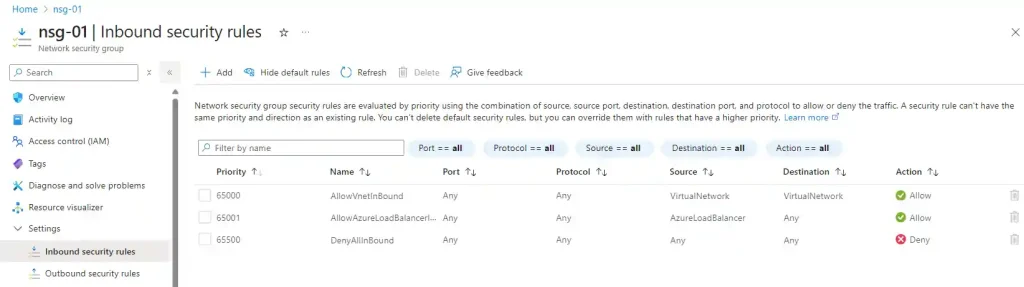
Every NSG comes with default rules you cannot delete (but can override). Here's what you get:
Default Inbound Rules:
| Priority | Name | Action | Description |
| 65000 | AllowVnetInBound | Allow | Allow all VNet traffic |
| 65001 | AllowAzureLBInBound | Allow | Allow Azure Load Balancer |
| 65500 | DenyAllInBound | Deny | Deny all other inbound |
Default Outbound Rules:
| Priority | Name | Action | Description |
| 65000 | AllowVnetOutBound | Allow | Allow all VNet traffic |
| 65001 | AllowInternetOutBound | Allow | Allow internet outbound |
| 65500 | DenyAllOutBound | Deny | Deny all other outbound |
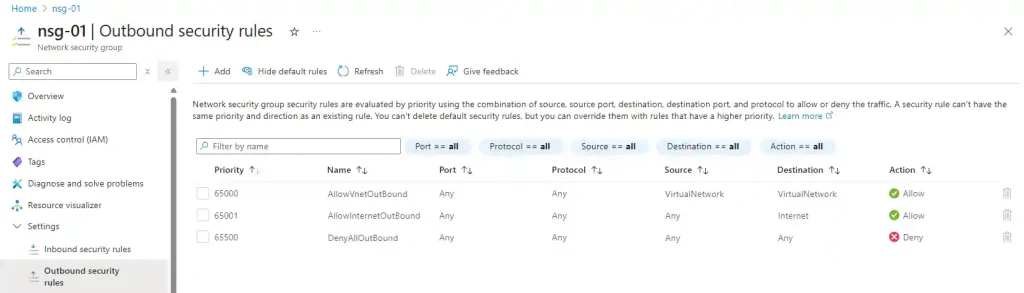
The key takeaway? By default, VMs in the same VNet can talk to each other, and outbound internet access is allowed. Inbound traffic from the internet is blocked unless you explicitly allow it.
NSG at Subnet Level vs NIC Level: What's Best?
This is one of the most common questions and this is one of the questions I often got when I first started my cloud journey. Should you apply NSGs at the subnet level, NIC level, or both? The answer depends on your needs.
| Level | Pros | Cons |
| Subnet-level | Easier to manage, applies to all resources in subnet | Less granular control |
| NIC-level | Granular VM-specific rules | More management overhead |
| Both | Defense in depth, maximum control | Complex to troubleshoot |
My recommendation: Start with subnet-level NSGs for broad rules, and add NIC-level NSGs only when you need specific exceptions. Don't over-complicate things—simpler is usually better for maintenance.
How to Restrict Traffic Between Subnets
Remember that default rule "AllowVnetInBound"? It means all subnets in your VNet can communicate by default. For many scenarios, you'll want to change this.
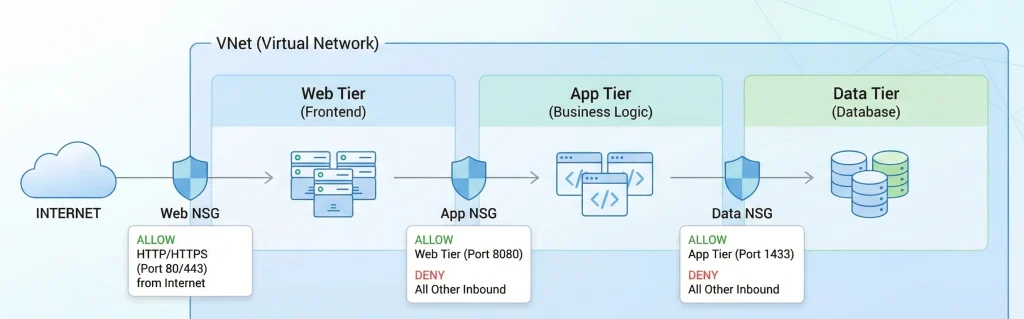
Let's say you have a three-tier architecture: web servers, application servers, and database servers. You probably want:
- Web subnet can only talk to application subnet on specific ports
- Application subnet can talk to database subnet on SQL port (1433)
- Database subnet cannot initiate connections to other subnets
To achieve this, you'd create NSG rules that explicitly allow the traffic you need, then add a deny rule with a lower priority to block everything else between subnets.
Service Tags and Application Security Groups
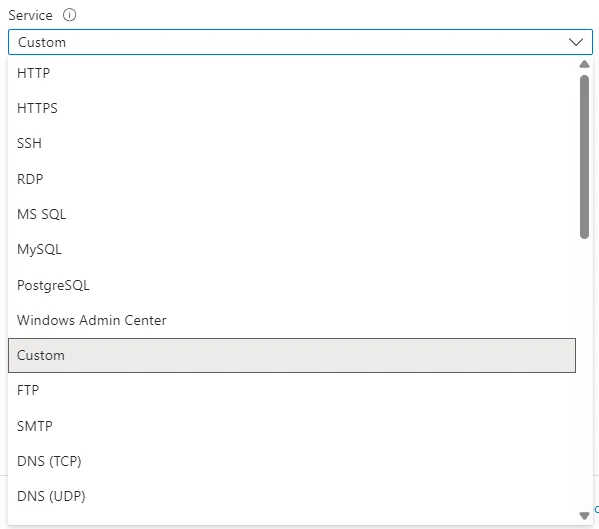
Managing IP addresses in NSG rules can get messy fast. Azure gives you two powerful tools to simplify things: Service Tags and Application Security Groups.
What Are Service Tags?
Service tags represent groups of IP addresses for specific Azure services. Instead of managing individual IPs, you use a tag like "Storage" or "AzureCloud." Microsoft keeps these updated automatically.
Common service tags include:
- VirtualNetwork: All VNet addresses, connected networks, and on-premises ranges
- AzureLoadBalancer: Azure's infrastructure load balancer
- Internet: Public IP addresses outside Azure
- Storage: Azure Storage IP ranges
- Sql: Azure SQL Database IP ranges
What Are Application Security Groups (ASGs)?
ASGs let you group VMs by function rather than IP address. You can create groups like "WebServers" or "DatabaseServers" and reference them directly in NSG rules.
This is incredibly useful for dynamic environments where VMs come and go. When you add a new web server, just add it to the WebServers ASG—the rules automatically apply.
NSG vs Azure Firewall: What's the Difference?
I see this confusion all the time. "Why do I need Azure Firewall if I have NSGs?" Great question. They're complementary, not competing.
| Feature | NSG | Azure Firewall |
| OSI Layer | Layer 3-4 | Layer 3-4-7 |
| Cost | Free | ~$1.25/hour + data |
| FQDN Filtering | No | Yes |
| Threat Intelligence | No | Yes |
| Use Case | Basic traffic filtering | Advanced perimeter security |
Bottom line: Use NSGs for basic subnet/VM level filtering (it's free!). Add Azure Firewall when you need advanced features like FQDN filtering, threat intelligence, or centralized logging across your entire network.
Combining NSGs with Azure Firewall for Layered Security
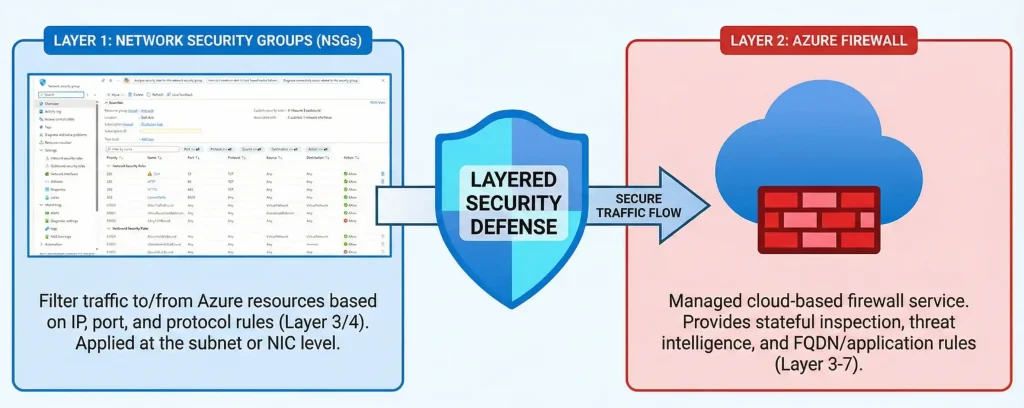
The best Azure networks use both NSGs and Azure Firewall together. This is called "defense in depth"—multiple layers of security.
Here's a typical architecture:
- Azure Firewall at the perimeter controls north-south traffic (in/out of VNet)
- NSGs on subnets control east-west traffic (between subnets)
- NIC-level NSGs for specific VM requirements
Monitoring with NSG Flow Logs and Traffic Analytics
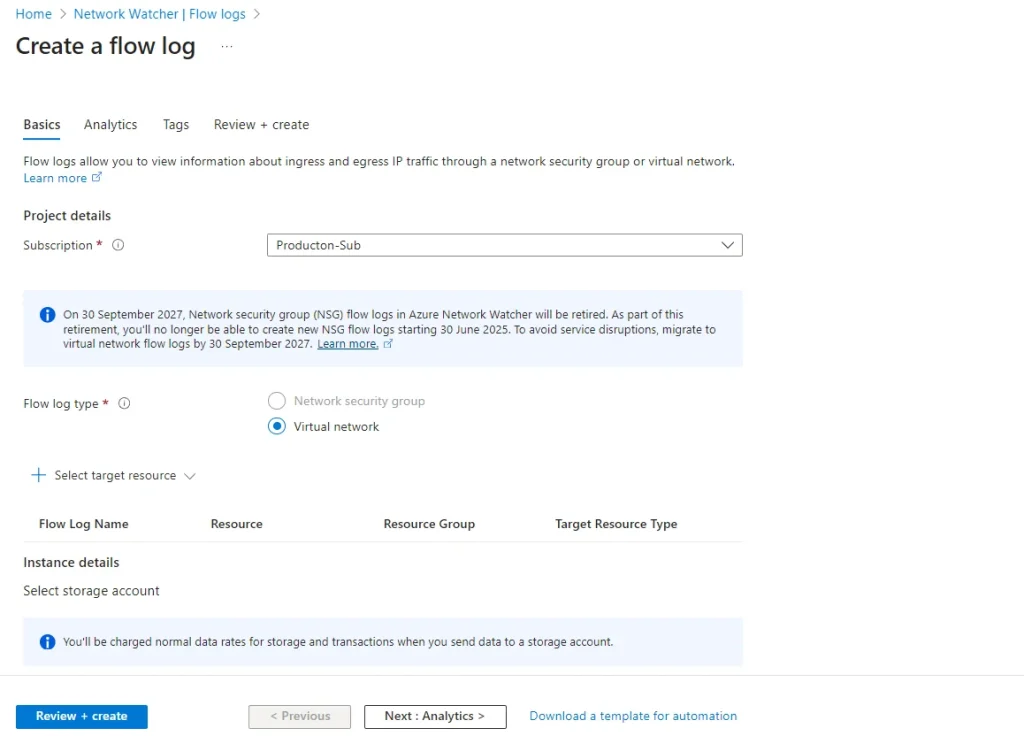
Also you can't secure what you can't see. NSG Flow Logs capture information about traffic flowing through your NSGs—source/destination IPs, ports, protocols, and whether traffic was allowed or denied.
Important update: NSG flow logs will be retired on September 30, 2027. Microsoft recommends migrating to Virtual Network flow logs, which offer more capabilities. If you're starting fresh, go straight to VNet flow logs. After June 30, 2025, we no longer be able to create new NSG flow logs.
Traffic Analytics takes flow logs to the next level, giving you visual dashboards and insights into your network traffic patterns. It's incredibly useful for:
- Identifying unusual traffic patterns
- Troubleshooting connectivity issues
- Understanding bandwidth consumption
- Security auditing and compliance
Are NSGs Stateful or Stateless?
NSGs are stateful. This is a crucial point that trips up many people new to Azure networking.
What does stateful mean? When you allow inbound traffic (say, HTTPS on port 443), the response traffic is automatically allowed without needing a separate outbound rule. The NSG remembers the connection state.
This simplifies rule management significantly. You don't need to create mirror rules for every allowed connection.
Best Practices for NSG Rules and Design
After working with hundreds of Azure deployments, here are my top recommendations:
- Use descriptive names: "Allow-HTTPS-From-Internet" beats "Rule1" every time.
- Document your rules: Add meaningful descriptions explaining why each rule exists.
- Start restrictive: Only open what you need. Default deny is your friend.
- Use service tags: Don't hardcode IPs when service tags exist.
- Leverage ASGs: Group VMs by function for easier management.
- Enable flow logs: You need visibility to troubleshoot and audit.
- Review regularly: Rules accumulate. Schedule periodic cleanups.
- Test before production: A misconfigured NSG can block legitimate traffic.
Azure NSG Limits You Should Know
Azure has limits on NSGs that you should be aware of:
- NSGs per subscription per region: 5,000
- Rules per NSG: 1,000
- Source IPs per rule: 4,000
If you're hitting these limits, it might be time to redesign your architecture or use ASGs to consolidate rules.
Real-World Scenario: Securing a Web Application
Let me walk you through a practical example. You're deploying a web application with:
- Web servers in a public subnet
- Application servers in a private subnet
- Database server in another private subnet
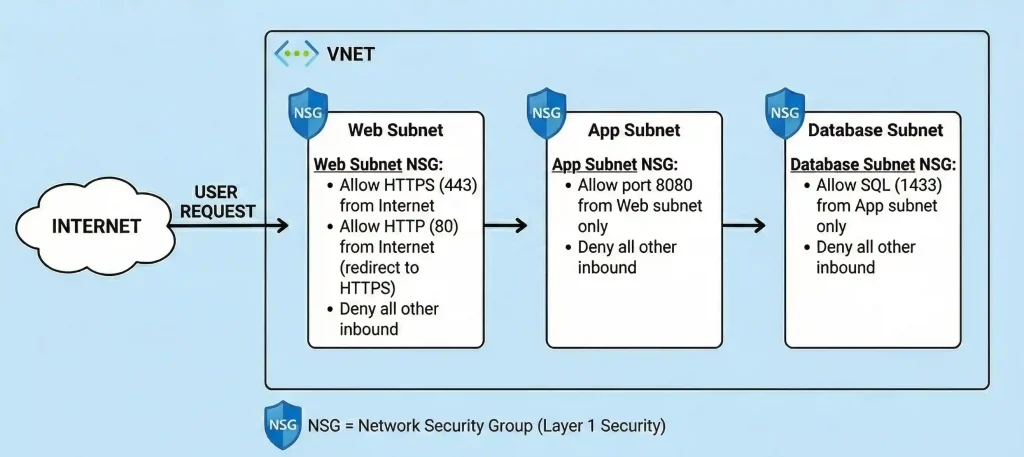
Here's how you'd configure NSGs:
Web Subnet NSG:
- Allow HTTPS (443) from Internet
- Allow HTTP (80) from Internet (redirect to HTTPS)
- Deny all other inbound
App Subnet NSG:
- Allow port 8080 from Web subnet only
- Deny all other inbound
Database Subnet NSG:
- Allow SQL (1433) from App subnet only
- Deny all other inbound
Frequently Asked Questions
What is an Azure Virtual Network (VNet) and why is it needed?
An Azure VNet is your private network in the cloud. It provides isolated address space for your resources to communicate securely. You need it because it's the foundation for deploying VMs, databases, and other services while maintaining network isolation from other customers.
What is a Network Security Group (NSG) and what problem does it solve?
An NSG is a virtual firewall that filters network traffic based on rules. It solves the problem of controlling what traffic can reach your resources. Without NSGs, your VMs would be exposed to unwanted traffic, creating security risks.
Can I use the same NSG for multiple subnets?
Short answer is Yes, you can associate one NSG with multiple subnets and network interfaces. However, each subnet or NIC can only have one NSG at a time. Be careful though—sharing NSGs means changes affect all associated resources.
What happens if no NSG is associated with a subnet?
If no NSG is associated with a subnet, all traffic is not allowed by default(If you are using Standard SKU Public IP). For VMs with standard public IPs, traffic is blocked unless an NSG is applied. Always apply NSGs to control traffic—don't rely on defaults.
Can NSGs block traffic between VMs in the same subnet?
Yes, but you need NIC-level NSGs for this. Subnet-level NSGs don't filter traffic between VMs in the same subnet because that traffic doesn't cross the subnet boundary. Apply NSGs to each VM's NIC for intra-subnet control.
How do I troubleshoot NSG connection issues?
Use Azure Network Watcher's IP flow verify tool to test specific traffic flows. Check NSG flow logs to see what's being allowed or denied. Also verify you don't have conflicting rules at both subnet and NIC levels. The Azure Portal's "Effective security rules" view is incredibly helpful. Also You can use vm troubleshooter option.
Do NSG rules apply to Azure PaaS services?
It depends on the service you use. For PaaS services integrated into your VNet (like App Service Environment or SQL Managed Instance), NSG rules apply. For other PaaS services, use service endpoints or private endpoints combined with NSG rules on your subnet.
Can I export and import NSG rules?
Yes! You can export NSG configurations as ARM templates and import them elsewhere. This is great for deploying consistent security policies across environments. You can also use Azure PowerShell or CLI to script rule management.
Conclusion: Build Secure Networks with Confidence
Azure Virtual Networks and Network Security Groups are the dynamic duo of Azure network security. VNets give you the isolated network infrastructure, while NSGs let you control exactly what traffic flows through it.
The key takeaways to remember:
- VNets provide isolation and connectivity options
- NSGs filter traffic at subnet and NIC levels
- Rules are evaluated by priority (lower = higher priority)
- NSGs are stateful—return traffic is automatic
- Use service tags and ASGs to simplify management
- Consider Azure Firewall for advanced perimeter security
My Advice : Start simple, document everything, and build up your rules as needed. Don't try to create the perfect NSG configuration on day one—it evolves with your application.
Ready to get hands-on? Head over to the Azure Portal and create a test VNet with subnets and NSGs. There's no better way to learn than by doing. And remember—in a test environment, you can't break anything permanently!
Have questions about securing your Azure network? Drop a comment below or connect with me on LinkedIn. Happy networking!



No comments yet. Be the first to share your thoughts!