

You know that feeling when you're sipping your morning coffee, and suddenly realize your web hosting is more complicated than assembling IKEA furniture? Yeah, I've been there. But here's the thing - Azure Static Web Apps just changed the game, and I'm about to show you why it's like having a personal assistant for your web projects.
What Exactly is Azure Static Web Apps? (And Why Should You Care?)
Picture this: You've built this gorgeous website - maybe it's a React app, maybe it's Angular, or perhaps you're old school with vanilla JavaScript. Now what? You need hosting, right? That's where Azure Static Web Apps swoops in like your tech-savvy best friend.
Simply put, it's Microsoft's answer to "I just want my website online without the drama." It's a hosting service that takes your static files (HTML, CSS, JavaScript) and serves them globally at blazing speeds. But wait - there's more! It also handles your serverless Azure Static Web Apps backend with Azure Functions. Pretty neat, no?
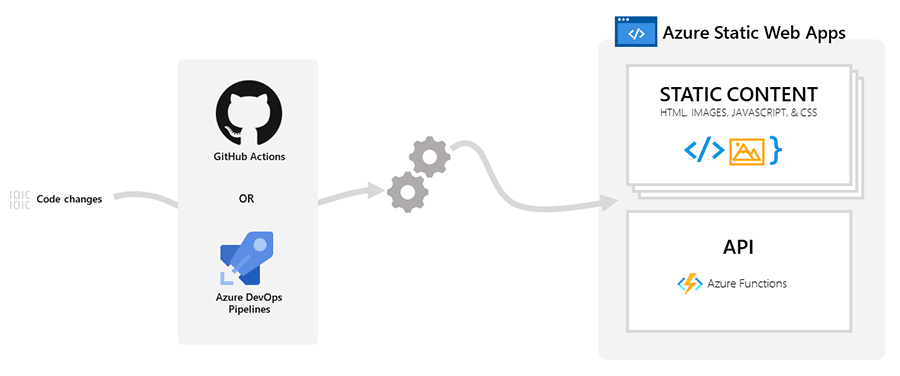
Image Source : https://learn.microsoft.com/en-us/azure/static-web-apps/overview
The beauty? You get:
- Automatic builds and deployments (because who has time for manual work?)
- Free SSL certificates (security without the price tag)
- Global content delivery (your site loads fast whether someone's in New York or Colombo)
- Built-in authentication (keep the riffraff out)
How to Deploy Your First Azure Static Web App (It's Easier Than Making Instant Noodles!)
Alright, let's get our hands dirty. I promise this won't be like those other tutorials that make you feel like you need a PhD in computer science.
Step-by-Step Deployment Guide
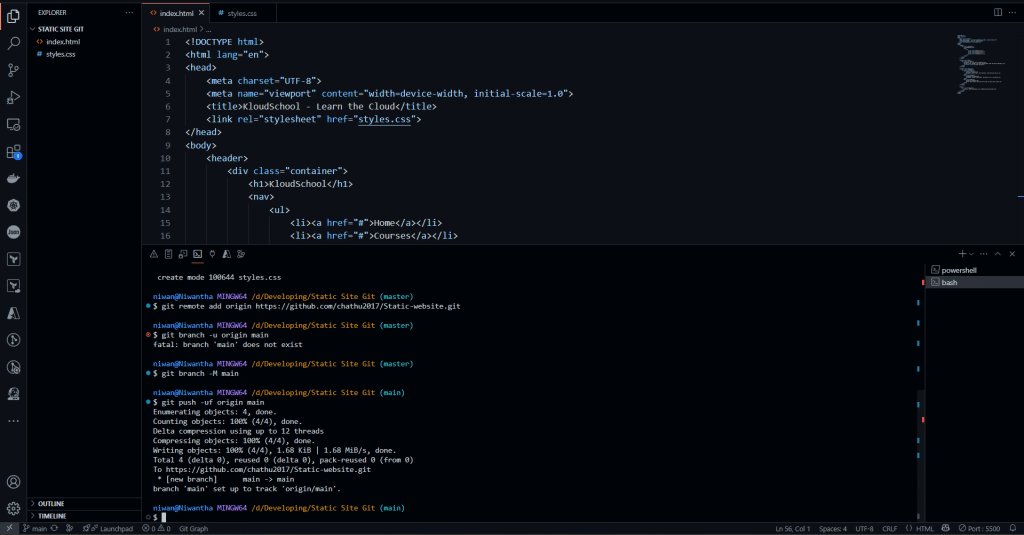
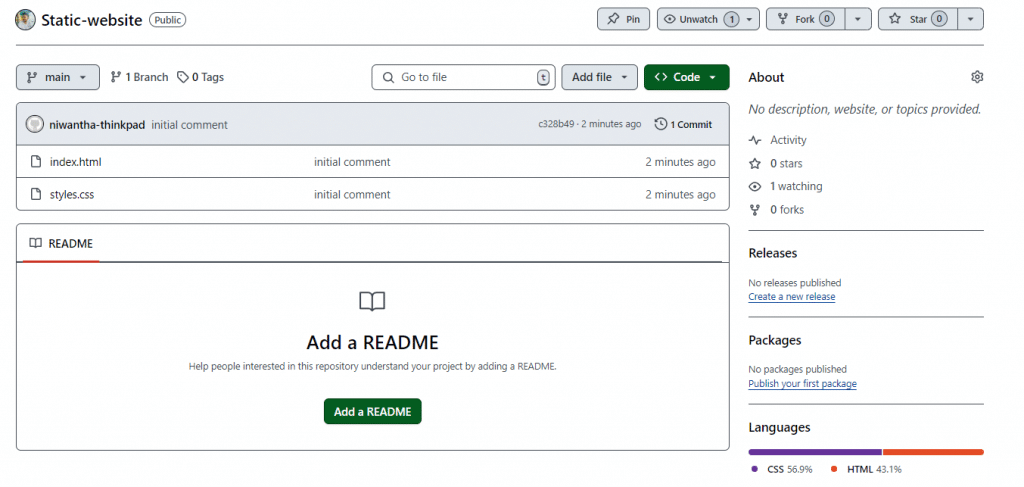
Create Git Repository with Simple html and CSS file.
Now Create Static Web App
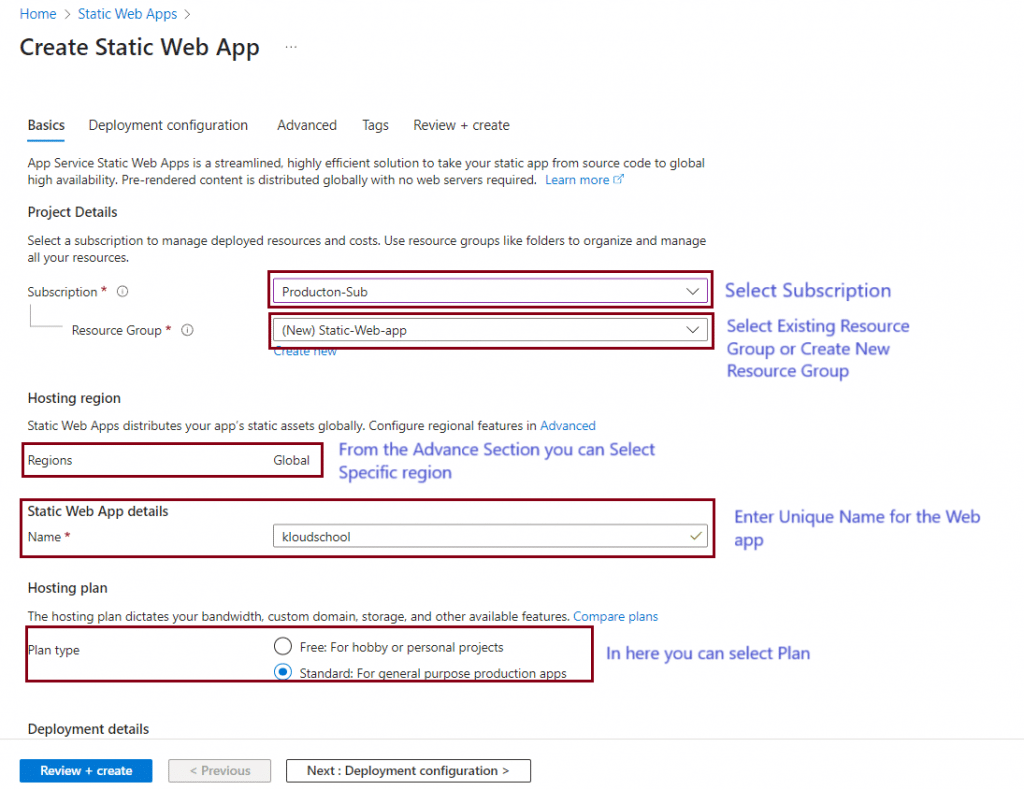
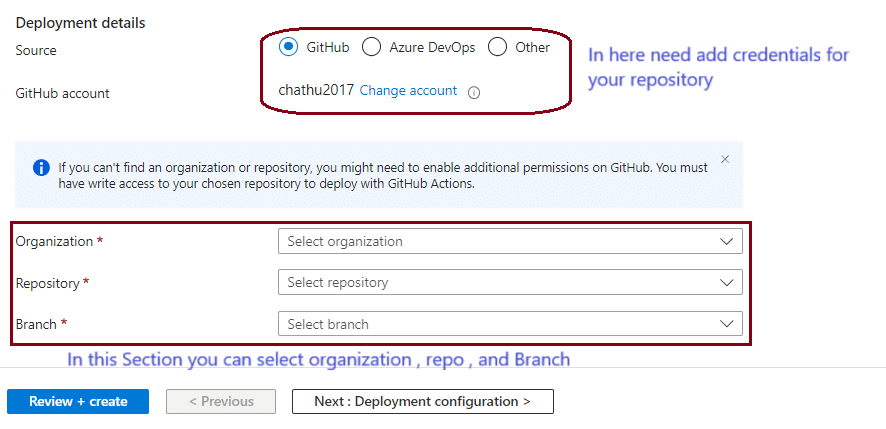
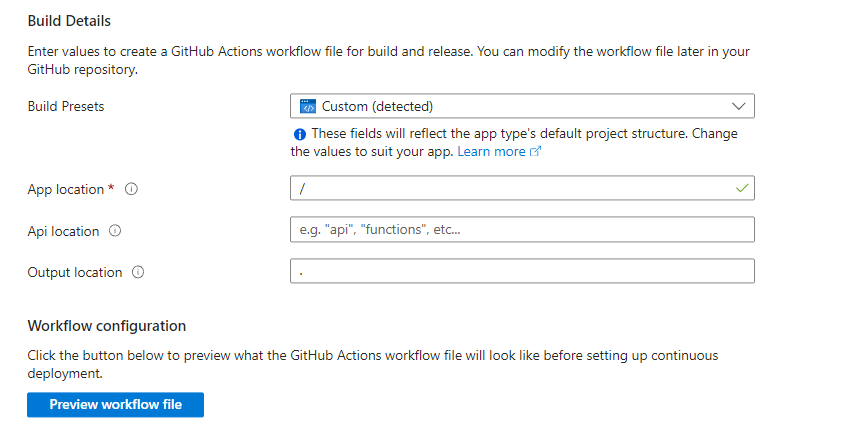
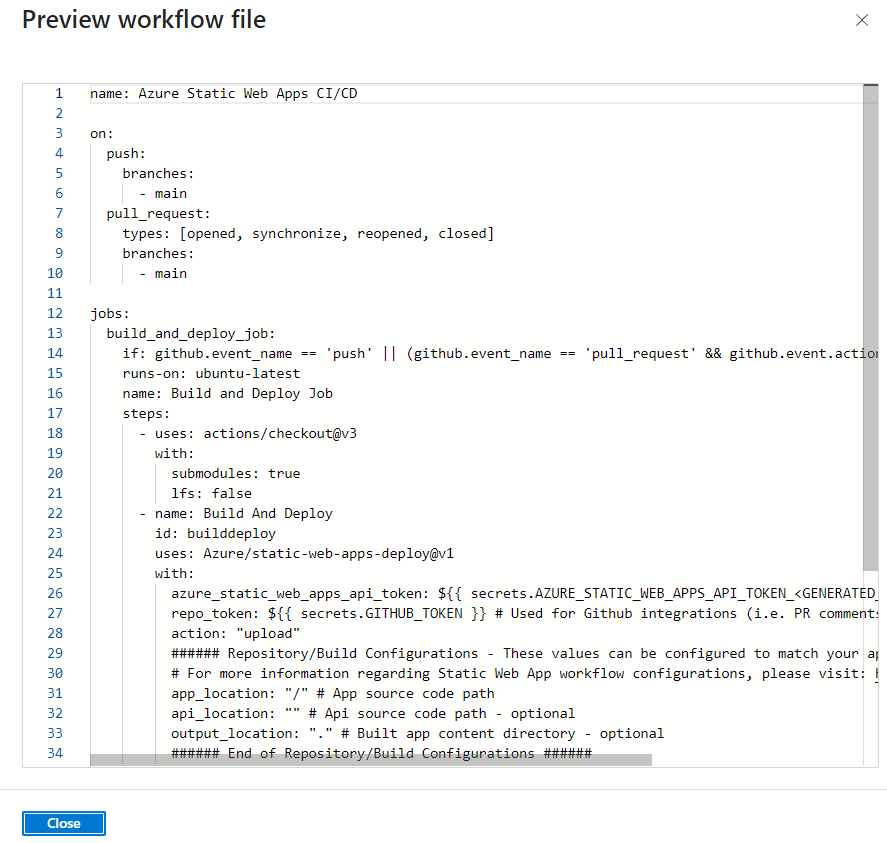
After the click Preview workflow file Button you can see GitHub Action file
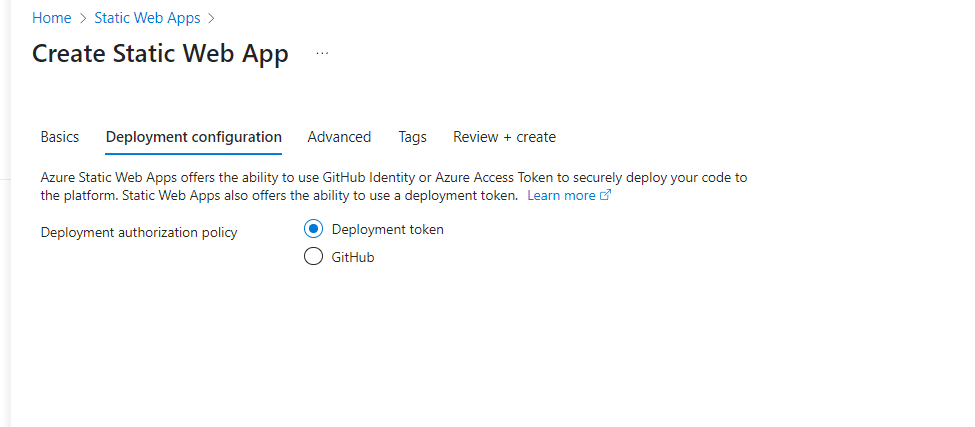
Select Deployment authorization policy with Development token and Click next
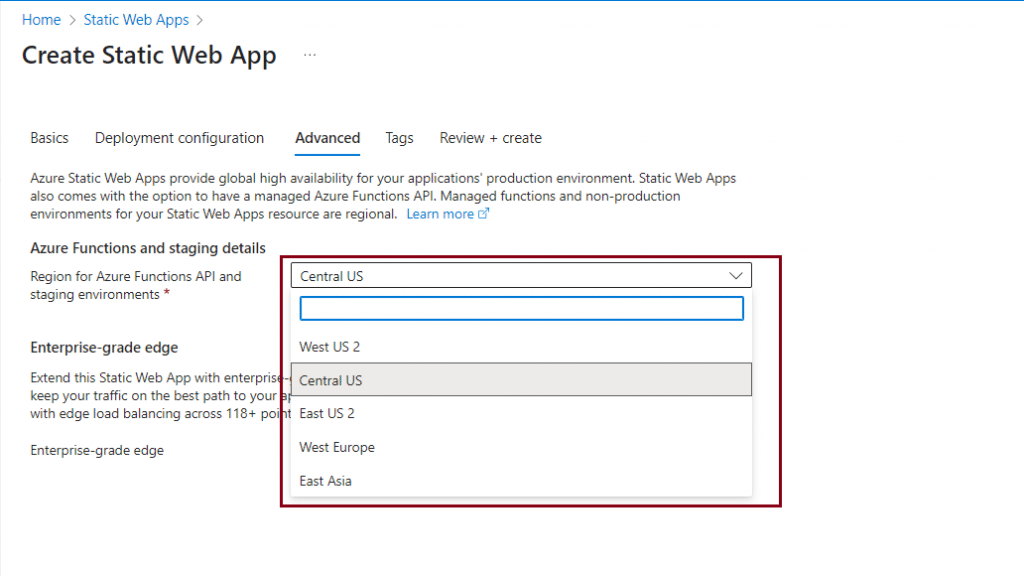
From the Advance section You can select Specific Region and Enterprise-grade edge
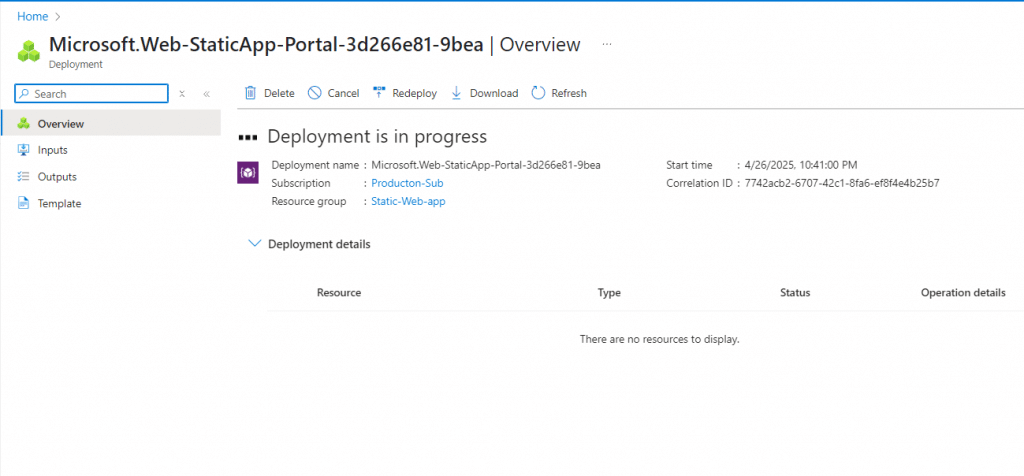
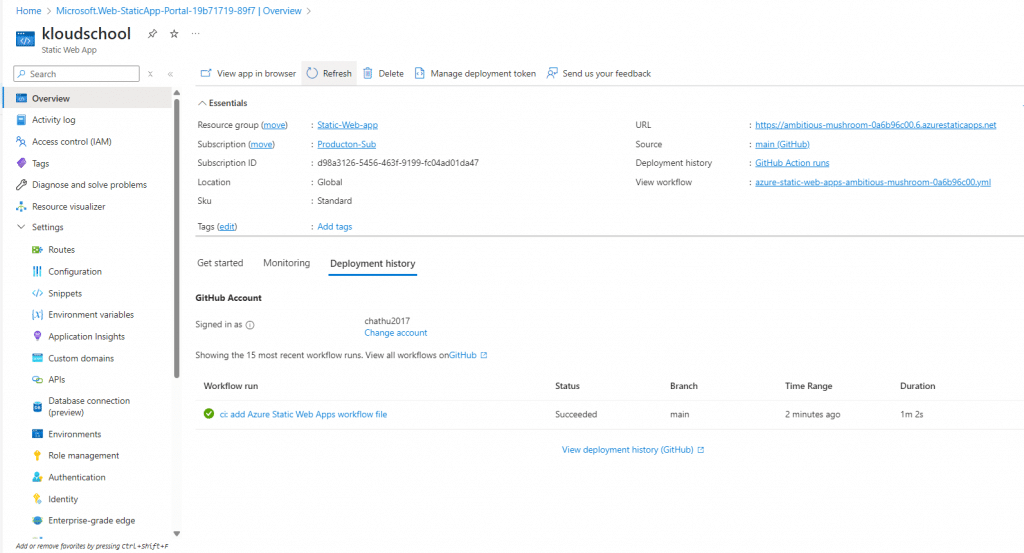
Now Our web app is Deployed
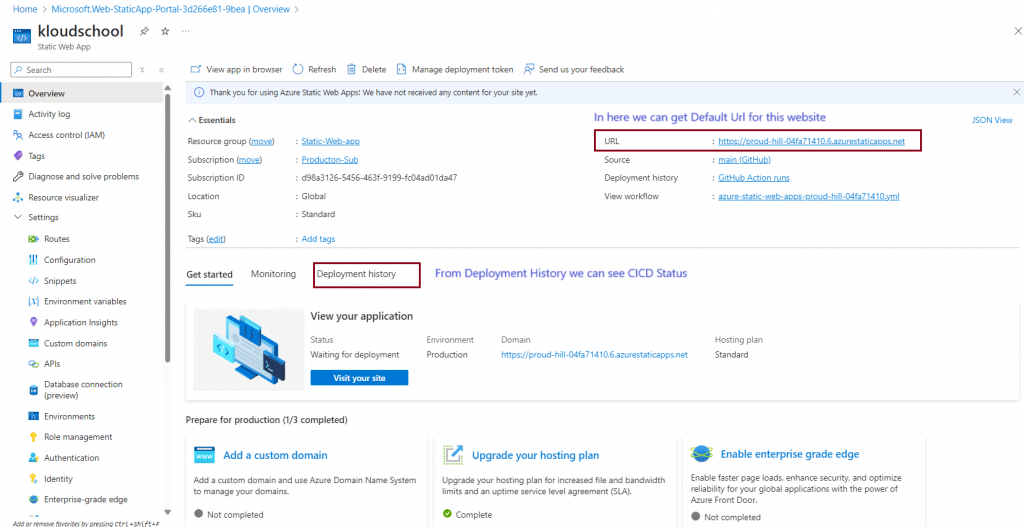
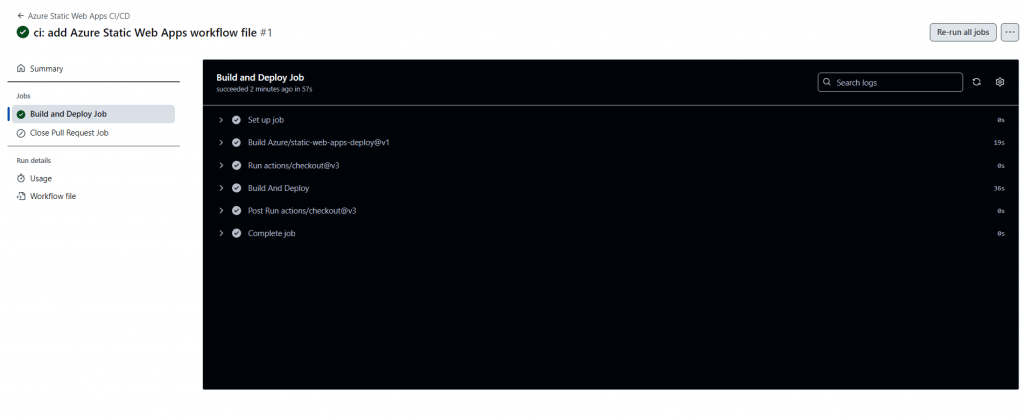
Now we can see that the deployment was successful.
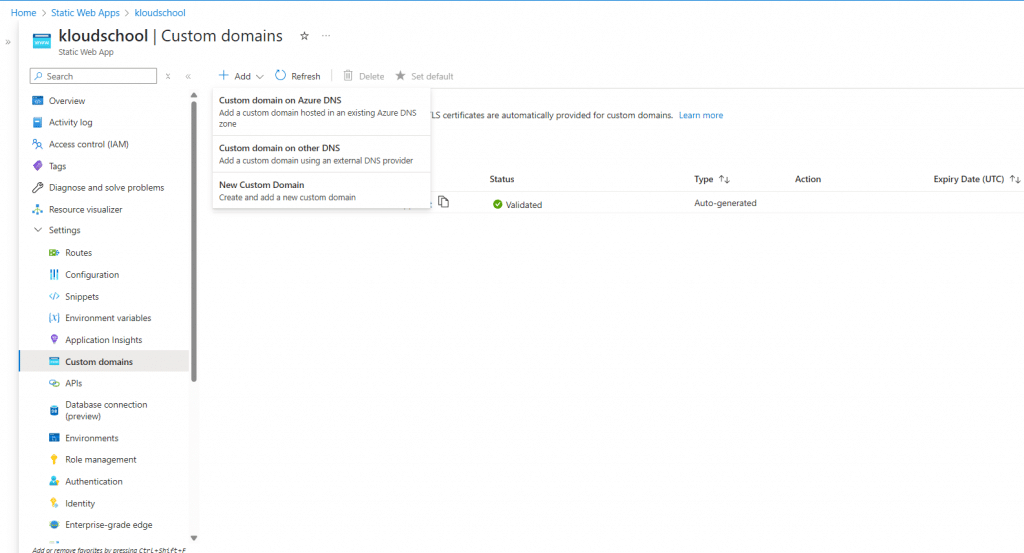
As shown in the picture below, we can add custom domains here, and Azure Static Web Apps will automatically bind the SSL certificate.
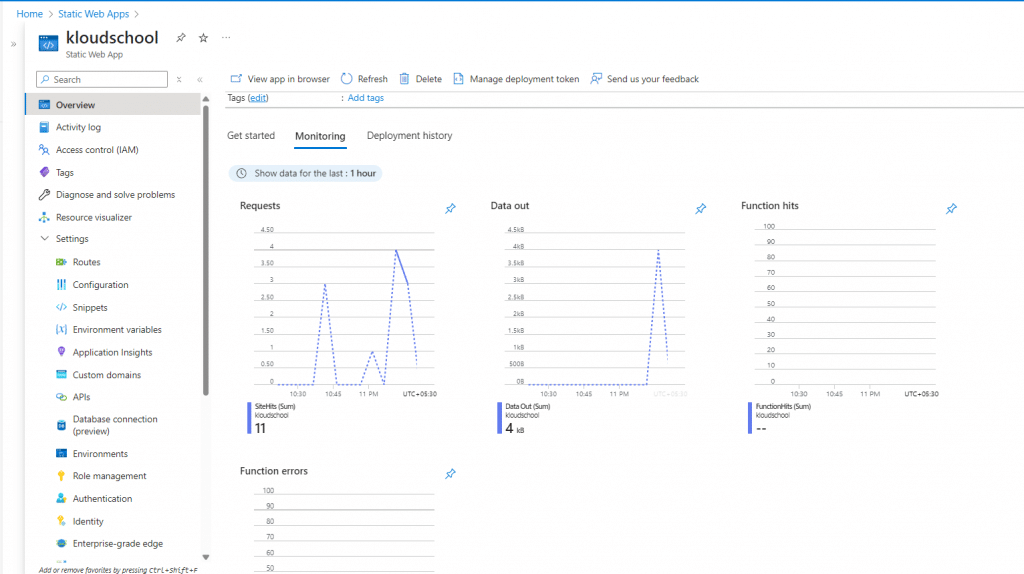
From the Monitoring tab, we can see a clear view of our application's performance.
Which Frontend Frameworks Play Nice with Azure Static Web Apps?
You're probably wondering, "Will my favorite framework work?" Good news - Azure Static Web Apps is like that friend who gets along with everyone at the party.
Supported Frameworks:
| Framework | Support Level | Why It's Awesome |
|---|---|---|
| React | ⭐⭐⭐⭐⭐ | Perfect integration, especially Azure Static Web Apps React projects |
| Angular | ⭐⭐⭐⭐⭐ | Smooth sailing with TypeScript |
| Vue.js | ⭐⭐⭐⭐⭐ | Works like a charm |
| Blazor | ⭐⭐⭐⭐⭐ | Microsoft's own baby - of course it works! |
| Next.js | ⭐⭐⭐⭐ | Static export support |
| Gatsby | ⭐⭐⭐⭐⭐ | Made for each other |
| Hugo | ⭐⭐⭐⭐ | Lightning fast builds |
| Jekyll | ⭐⭐⭐⭐ | Classic choice |
Basically, if it generates static files, Azure's got your back. Even if you're using something quirky like Eleventy - yep, that works too!
The GitHub Actions Magic (Or: How Your Code Deploys Itself)
Remember when deploying meant FTP-ing files like it's 2005? Those days are gone, my friend. Azure Static Web Apps GitHub integration is the real MVP here.
Here's how this beautiful dance works:
- You push code to GitHub (like you always do)
- GitHub Actions kicks in automatically (no button clicking required)
- Your site builds and deploys (while you grab another coffee)
- Changes go live globally (faster than you can say "deployment")
The Azure Static Web Apps continuous deployment setup is so smooth, you'll forget deployments used to be painful. Every time you merge a pull request, boom - your site updates. It's like having a tiny robot assistant who never sleeps.
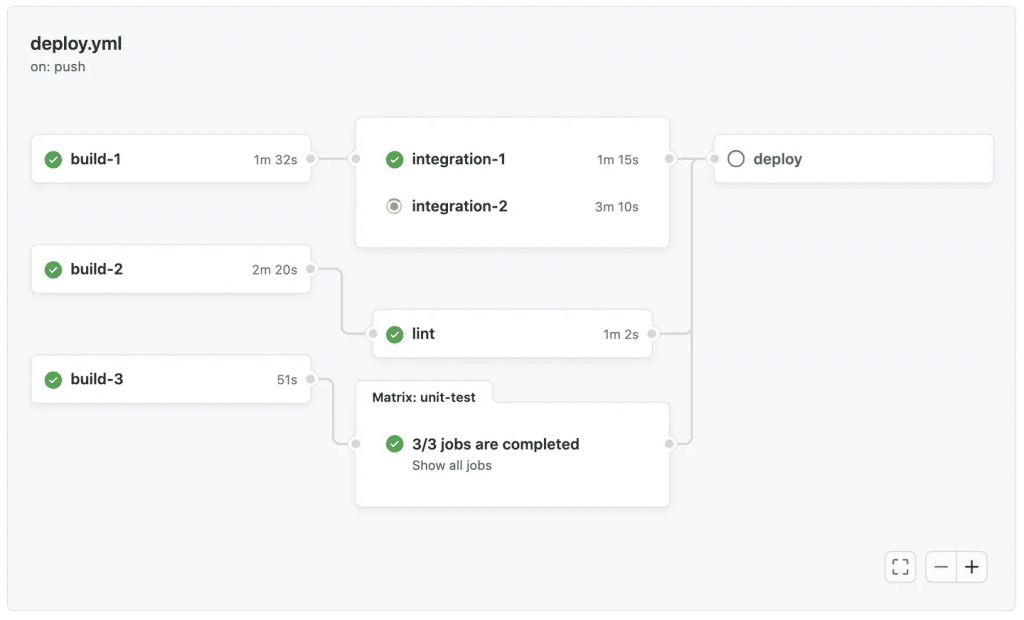
Image Link : https://docs.github.com/en/actions/how-tos/monitor-workflows/use-the-visualization-graph
Let's Talk Money: Azure Static Web Apps Pricing (Spoiler: There's a Free Tier!)
I know what you're thinking - "Here comes the catch, right?" Wrong! Microsoft actually gives you quite a bit for free. Let me break down the Azure Static Web Apps pricing for you:
Free Tier (Yes, Really Free!)
- 2 apps included
- 100 GB bandwidth per month (that's a LOT of visitors)
- Custom domains supported
- SSL certificates included
- GitHub Actions minutes included
Standard Tier ($9/app/month)
- Everything in Free
- Unlimited apps
- More bandwidth
- SLA guarantee
- Priority support
Want to play with the Azure Static Web Apps pricing calculator tutorial? It's actually pretty straightforward - not like those phone bills that need a detective to decipher.
Custom Domains and SSL: Making Your Site Look Professional
Nobody wants a website that screams "I'm using free hosting!" Setting up an Azure Static Web Apps custom domain is like putting on a nice shirt for a video call - instantly more professional.
The process? Ridiculously simple:
- Buy your domain (GoDaddy, Namecheap, wherever)
- Add a CNAME record (sounds scary, isn't)
- Tell Azure about it (few clicks in the portal)
- SSL certificate appears magically (seriously, it's automatic)
No more paying for SSL certificates or dealing with renewal headaches. It just... works.
Serverless APIs with Azure Functions (Backend Without the Back Pain)
Here's where things get spicy. Using Azure Functions serverless APIs in Static Web Apps means you can have backend functionality without managing servers. It's like having a kitchen that cleans itself!
You can:
- Process form submissions
- Handle authentication logic
- Connect to databases
- Call third-party APIs
- Run scheduled tasks
And the best part? These Azure Functions with Static Web Apps scale automatically. Got 10 users? Cool. Got 10,000 users suddenly? Also cool. Azure handles it like a boss.
Authentication Made Simple (Keep the Bad Guys Out)
Setting up Azure Static Web Apps authentication used to be my nightmare. Now? It's easier than remembering your Netflix password.
Configuring authentication providers in Azure Static Web Apps gives you options:
- GitHub (for the dev crowd)
- Twitter (for the social butterflies)
- Azure Active Directory (for the enterprise folks)
- Custom providers (for the control freaks - I mean, power users)
The built-in auth means you don't need to write authentication code. Just configure, and boom - your site knows who's who.
Staging Environments and Pull Request Previews (Test Before You Mess Up)
You know that mini heart attack when you deploy something and immediately spot a typo? Azure Static Web Apps staging environments setup saves you from that embarrassment.
Every pull request automatically gets its own preview URL. It's like having a dress rehearsal before the big show. Your team can review, test, and approve before anything touches production.
How staging environments and pull request previews work in Azure Static Web Apps:
- Create a pull request
- Azure builds a preview version
- Get a unique URL to share
- Test everything thoroughly
- Merge when ready
- Sleep peacefully at night
Azure Static Web Apps vs Other Hosting Solutions (The Honest Comparison)
Let's address the elephant in the room - Azure Static Web Apps vs Netlify comparison and others. I'm not here to bash anyone (we're all friends here), but let's be real about the limitations of Azure Static Web Apps compared to other hosting solutions.
| Feature | Azure Static Web Apps | Netlify | Vercel |
|---|---|---|---|
| Free Tier | Generous | Generous | Limited |
| Build Minutes | 300 min/month free | 300 min/month | 6000 min/month |
| Bandwidth | 100 GB free | 100 GB free | 100 GB free |
| Custom Domains | Free | Free | Free |
| Serverless Functions | Azure Functions | Netlify Functions | Vercel Functions |
| Enterprise Features | Strong | Good | Good |
| Microsoft Integration | Perfect | None | None |
The truth? They're all pretty solid. Choose Azure if you're already in the Microsoft ecosystem or need those enterprise features.
Best Practices for Security (Because Nobody Wants to Get Hacked)
Let's talk Azure Static Web Apps best practices for security. I've learned these the hard way (don't ask).
Security must-haves:
- Always use HTTPS (it's free, so no excuses)
- Implement proper CORS policies (control who can access your APIs)
- Use environment variables for secrets (never commit API keys!)
- Enable authentication where needed (not everything needs to be public)
- Regular dependency updates (boring but crucial)
- Monitor access logs (know who's knocking)
Troubleshooting Common Headaches
Even the best of us run into issues. Here's your guide to Azure Static Web Apps troubleshooting common errors:
"Build failed" errors? Check your Node version. Seriously, it's always the Node version.
"404 on refresh" problems? You need fallback routes for single-page apps. Add a staticwebapp.config.json file.
Slow builds? Use caching in your GitHub Actions. Your future self will thank you.
API not working? Make sure your functions are in the api folder. Azure's picky about that.
Performance and SEO Optimization (Make Google Love You)
Want those sweet, sweet Google rankings? Azure Static Web Apps SEO optimization tips coming right up:
- Enable compression (smaller files = faster loads)
- Optimize images (WebP format is your friend)
- Use proper meta tags (tell search engines what's what)
- Implement structured data (help Google understand your content)
- Monitor Core Web Vitals (speed matters more than ever)
For Azure Static Web Apps scaling and performance tips, remember:
- Use CDN caching effectively
- Minimize JavaScript bundles
- Implement lazy loading
- Optimize your build process
Monitoring Your App (Know What's Happening)
Azure Static Web Apps monitoring and analytics isn't just for nerds (okay, maybe a little). But seriously, you need to know:
- How many visitors you're getting
- Which pages are popular
- Where errors are happening
- How fast your site loads globally
Application Insights integration gives you all this data without breaking a sweat.
The Azure CLI Way (For Terminal Lovers)
If you're like me and prefer the command line, Azure Static Web Apps CLI is your new best friend. Deploy, configure, and manage everything without leaving your terminal. It's like having superpowers, but geekier.
bash
# Because clicking buttons is so yesterday
swa deploy --app-name my-awesome-app
earn Linux Zero to hero from here : https://kloudschool.com/linux-beginner-guide/
Integration with Azure DevOps (Enterprise Mode: Activated)
Need integrating Azure Static Web Apps with Azure DevOps? Maybe your company hasn't jumped on the GitHub train yet. No worries - Azure DevOps pipelines work beautifully too. Same automated goodness, different flavor.
Conclusion: Your Web Apps Deserve Better
Look, I've been building websites since dial-up was a thing (yes, I'm that old). Azure Static Web Apps isn't just another hosting platform - it's like upgrading from a bicycle to a Tesla. Sure, both get you places, but one does it with style, speed, and zero emissions.
Whether you're building your portfolio site, launching a startup, or managing enterprise applications, this platform has your back. The deploy Azure Static Web Apps process is so smooth, you'll actually enjoy deployments (I know, crazy right?).
So what are you waiting for? Your next web project deserves the Azure treatment. Trust me, once you experience how to deploy Azure Static Web Apps with GitHub Actions, you'll wonder how you ever lived without it.
Ready to jump in? Start with the free tier - no credit card needed. Build something awesome, and when your site goes viral (because it will), Azure's got you covered with automatic scaling.
Remember: great developers don't just write code - they ship it. And with Azure Static Web Apps, shipping has never been easier.
Got questions? Hit me up in the comments below. I love talking shop about web hosting almost as much as I love a good cup of Ceylon tea!





No comments yet. Be the first to share your thoughts!