


Latest Update : 2025-10-06
You know what? Managing cloud resources can feel like trying to organize your messy wardrobe on a Monday morning. But wait, I have something that will make your life much easier - let me introduce you to Azure Resource Manager (ARM). It's like having a personal assistant who never sleeps and always knows where everything is!
What is Azure Resource Manager? The Backbone of Your Azure World
Picture this: You're building a house, and instead of running around buying each brick, window, and door separately, you have one smart contractor who handles everything. That's exactly what Azure Resource Manager does for your cloud infrastructure!
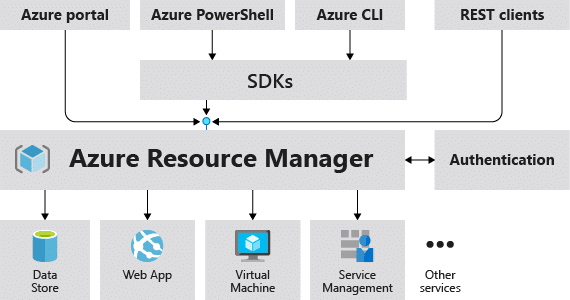
Simply speaking, Azure Resource Manager is the deployment and management service for Azure Cloud. It's the control plane that lets you create, update, and manage all your Azure resources. Think of it as the puppet master pulling all the strings behind the curtain - when you click anything on Azure portal, ARM is the one actually doing the work.
How Does Azure Resource Manager Work? Let's Break It Down
Here's the interesting part - every time you do something in Azure (whether through portal, PowerShell, CLI, or REST API), your request goes through ARM first. It's like the main receptionist at a big hotel who directs everyone to the right place!
The flow is simple:
- You make a request (create a VM, delete a storage account, etc.)
- ARM receives it and checks if you have permission
- ARM processes it and talks to the right Azure services
- Resources get created/modified/deleted as you requested
- ARM sends back the result to you
Pretty neat, no?
The Power of Resource Groups: Your Organization's Best Friend
Now, let me ask you something - have you ever tried finding that one important document in a messy folder? Frustrating, isn't it? That's why Azure gives us resource groups!
How Do Resource Groups Function in Azure Resource Manager?
Resource groups are like containers or folders where you keep related resources together. For example, if you're building a web application, you might have:
- Virtual machines
- Storage accounts
- Databases
- Network components
Instead of managing them individually (imagine the chaos!), you put them all in one resource group. Now you can:
- Deploy them together
- Monitor them as a unit
- Delete everything at once when you're done
- Apply policies and permissions to the whole group
Pro tip: Choose your resource group names wisely - you can't rename them later! (Yes, I learned this the hard way!)
Can Resource Groups Be Renamed in Azure Resource Manager?
Here's the thing - once you create a resource group, its name is permanent. It's like getting a tattoo! You can move resources between groups, but the group name itself? That's forever. So think twice before naming your resource group "test123" or "temporary-stuff"!
ARM Templates vs Other Deployment Methods: The Smart Choice
Let me tell you why ARM templates are like having a recipe book for your favorite dishes. You write the recipe once (in JSON format), and then you can cook the same dish perfectly every time!
What's the Difference Between ARM Templates and Other Deployment Methods?
| Deployment Method | Pros | Cons | Best For |
|---|---|---|---|
| Azure Portal | Easy, visual, no coding needed | Slow, manual, prone to errors | Quick one-time deployments |
| PowerShell/CLI | Scriptable, faster than portal | Need to learn commands | Automation scripts |
| ARM Templates | Repeatable, version-controlled, declarative | Learning curve for JSON | Production deployments |
| Bicep | Simpler syntax than ARM | Still relatively new | Modern Infrastructure as Code |
The beauty of ARM templates? They're declarative - you just describe what you want, not how to create it. It's like ordering food instead of cooking it yourself!
Let's Get Practical: ARM Template Demo
Remember that demo from the existing article? Let me show you an even better way to work with ARM templates. Here's what we're going to do:
Step 1: Creating Your First ARM Template
First, let's understand the basic structure. Every ARM template has these parts:
{
  "$schema": "...",
  "contentVersion": "1.0.0.0",
  "parameters": { },
  "variables": { },
  "resources": [ ],
  "outputs": { }
}
Think of it like a recipe card:
- Parameters: The ingredients you can change (like VM size)
- Variables: Calculated values (like storage account names)
- Resources: What you're actually creating
- Outputs: What you want to know after deployment
Step 2: Download and Redeploy Existing Resources
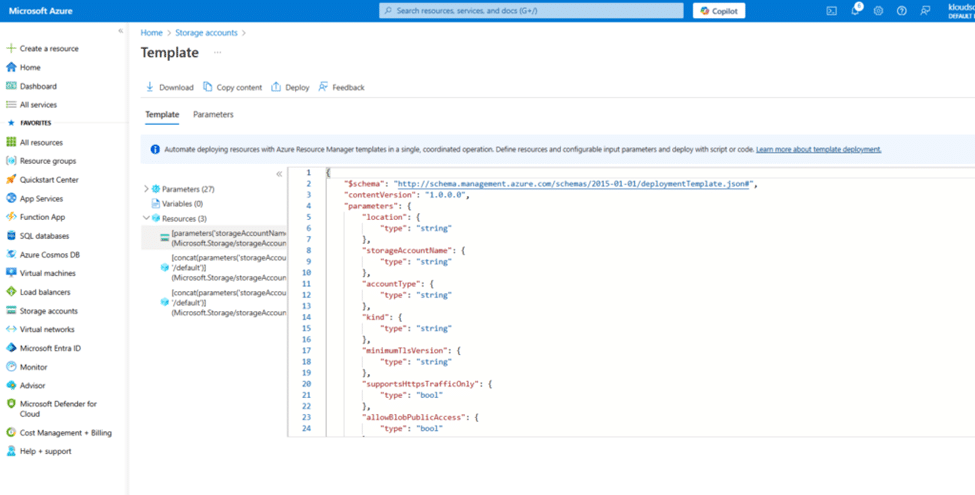
Here's a cool trick - you can export any existing resource as an ARM template! Let me walk you through it:
- Navigate to your resource in Azure Portal
- Look for "Export template" in the left menu (under Automation section)
- Click Download to get the template files
- Modify as needed (change names, locations, etc.)
- Deploy using Custom Deployment
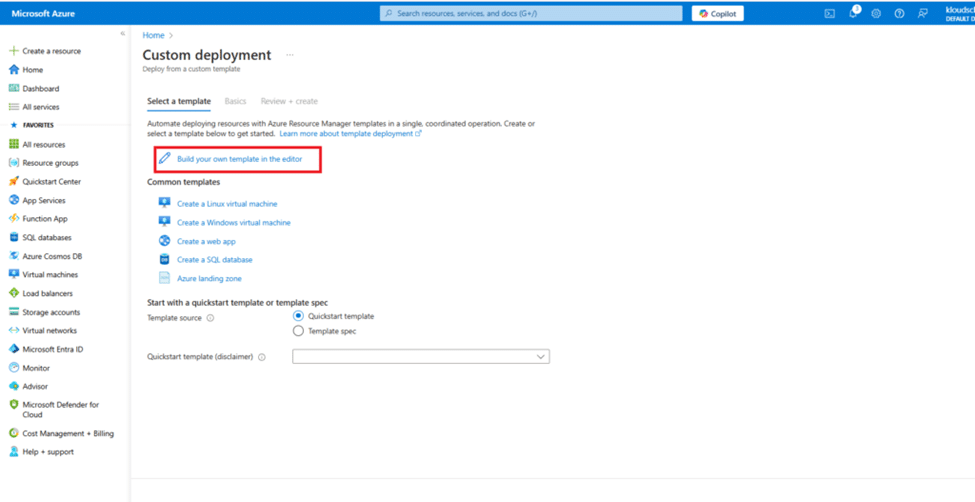
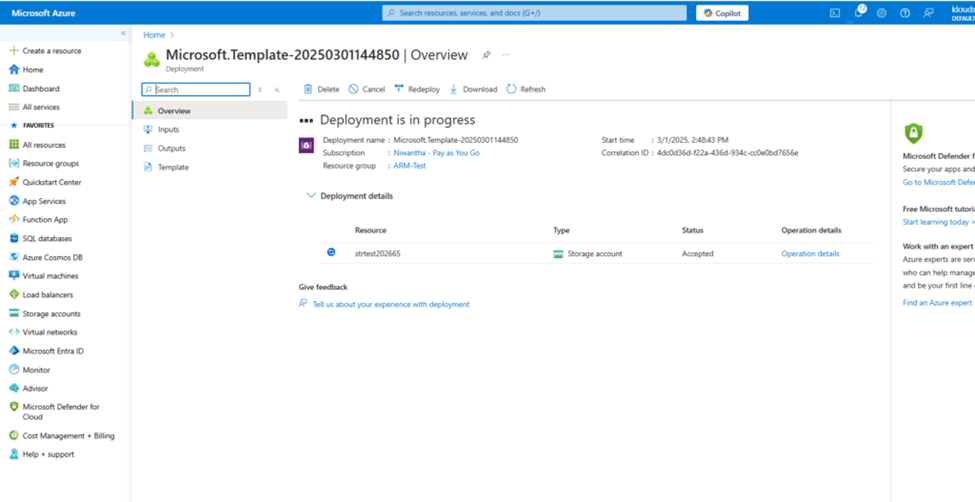
Step 3: Deploy Your Template
Search for "Deploy a custom template" in Azure Portal, then:
- Click "Build your own template in the editor"
- Upload your template.json file
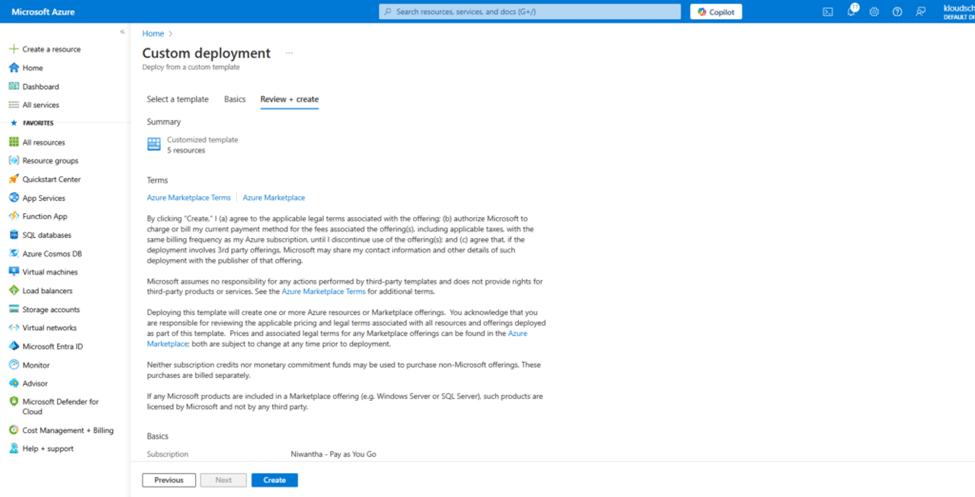
- Fill in the parameters
- Review and create!
Security and Access Control: Keeping Your Castle Safe
Now, I know what you're thinking - "This sounds powerful, but is it secure?" Absolutely! Let me explain.
How Does Azure Resource Manager Enforce Access Control and Permissions?
ARM uses something called Role-Based Access Control (RBAC). It's like having different keys for different rooms in your house. You can give:
- Owner access: Full control (the master key)
- Contributor access: Can do everything except give permissions
- Reader access: Can only look, not touch
You assign these roles at different levels:
- Subscription level (entire Azure account)
- Resource group level (specific projects)
- Individual resource level (that one special database)
How Do You Secure Azure Resources with Azure Resource Manager?
Here are my favorite security tricks:
1. Use Resource Locks - It's like putting a "Do Not Touch!" sign
- CanNotDelete: Prevents accidental deletion
- ReadOnly: Nobody can modify it
2. Apply Azure Policies - Set rules that everyone must follow
- Enforce naming conventions
- Restrict locations
- Require specific tags
3. Enable Monitoring - Keep an eye on everything
- Activity logs show who did what
- Diagnostic settings for detailed tracking
Automation Magic: Work Smarter, Not Harder
How Do You Automate Deployments with ARM Templates?
You know what's better than clicking buttons all day? Having machines do it for you! Here's how:
Option 1: Azure DevOps Pipelines
- Store templates in Git
- Create build pipelines
- Deploy automatically on code changes
Option 2: GitHub Actions
- Similar to DevOps but using GitHub
- Great for open-source projects
Option 3: PowerShell/CLI Scripts
New-AzResourceGroupDeployment -ResourceGroupName "MyRG" -TemplateFile "template.json"
Simple, right? You can even schedule these to run at specific times!
Organizing Your Azure Kingdom: Tags and Management
How Can You Organize and Tag Resources for Better Management?
Imagine having hundreds of resources - how do you find anything? Tags are your answer! They're like sticky notes on your resources.
Smart Tagging Strategy:
- Environment: Dev, Test, Prod
- Owner: Who's responsible
- Cost Center: Who's paying
- Project: Which project it belongs to
- Created Date: When it was made
You can then:
- Filter resources by tags
- Generate cost reports by tags
- Apply policies based on tags
Troubleshooting: When Things Go Wrong (They Will!)
How Do You Troubleshoot Deployment Failures?
Don't panic! Here's your troubleshooting checklist:
- Check the Activity Log - It shows exactly what failed
- Validate your template - Use the validation API before deploying
- Review quotas - Maybe you've hit Azure limits
- Check dependencies - Resources must be created in correct order
- Examine error codes - Azure gives specific error codes for each problem
Common issues I've seen:
- Names already taken (storage accounts need globally unique names!)
- Missing required parameters
- Circular dependencies
- Insufficient permissions
Advanced Features: Level Up Your ARM Game
What Are the Supported Deployment Scopes?
ARM templates can deploy at different levels:
- Resource Group (most common)
- Subscription (for subscription-level resources)
- Management Group (for enterprise governance)
- Tenant (for tenant-wide policies)
What Happens If Two Operations Update the Same Resource Simultaneously?
Good question! ARM handles this gracefully with something called optimistic concurrency control. The last update wins, but ARM ensures data consistency. It's like having multiple people editing a Google Doc - the system manages conflicts automatically.
Cost Management: Keep Your Bills Under Control
How Is Billing Managed Using Azure Resource Manager Features?
Money matters, doesn't it? Here's how ARM helps you track costs:
Cost Analysis by Resource Groups
- See spending per project
- Compare monthly trends
- Set budget alerts
Tags for Cost Tracking
- Filter costs by department
- Identify expensive resources
- Generate chargeback reports
Resource Locks to Prevent Costly Mistakes
- Lock production resources
- Prevent accidental scaling
- Control who can modify expensive resources
ARM Template Best Practices: Learn from My Mistakes!
Let me share what I've learned the hard way:
1. Use Parameters Wisely
Don't hardcode values - make them parameters so you can reuse templates
2. Leverage Variables
Calculate values once, use them multiple times
3. Add Comments
Your future self will thank you!
4. Version Control Everything
Store templates in Git - track changes, rollback if needed
5. Test in Dev First
Always, always test in a non-production environment
6. Use Linked Templates
Break large templates into smaller, manageable pieces
Azure Bicep vs ARM Templates: The New Kid on the Block
You might have heard about Bicep - it's like ARM templates' cooler younger brother. Same power, simpler syntax!
ARM Template:
{
  "type": "Microsoft.Storage/storageAccounts",
  "apiVersion": "2021-04-01",
  "name": "mystorageaccount",
  "location": "eastus"
}
Bicep:
resource storage 'Microsoft.Storage/storageAccounts@2021-04-01' = {
  name: 'mystorageaccount'
  location: 'eastus'
}
See the difference? Bicep is cleaner, easier to read. But don't worry - it compiles to ARM templates anyway!
Monitor and Maintain: Keep Everything Running Smoothly
Monitor ARM Template Deployments
Set up these monitoring essentials:
- Azure Monitor for real-time metrics
- Log Analytics for detailed logs
- Application Insights for application performance
- Cost Management alerts for budget tracking
Conclusion: Your ARM Journey Starts Now!
So there you have it - Azure Resource Manager isn't just another Azure service. It's THE service that makes everything else work smoothly. From organizing resources with groups to automating deployments with templates, ARM is your key to efficient cloud management.
Remember:
- Start small - Create simple templates first
- Learn by doing - Export existing resources and study their templates
- Stay organized - Use resource groups and tags religiously
- Think security - Apply RBAC and resource locks
- Automate everything - If you do it twice, template it!
Ready to become an ARM master? Start by creating your first template today. Trust me, once you experience the power of Infrastructure as Code, you'll never go back to clicking through the portal!
Have questions about Azure Resource Manager? Found this guide helpful? Drop a comment below and let's discuss! And hey, if you're building something cool with ARM templates, I'd love to hear about it!
Note : If you are going to deploy azure virtual machine, as per you know azure virtual machine has many dependencies. Ex : Disk , NSG(Network security group), IP address , VNET (Virtual Network).
What's your next step? Will you export an existing resource and study its template? Or jump straight into creating your own? Either way, the cloud is yours to command!



No comments yet. Be the first to share your thoughts!