


You know that feeling when your Azure environment starts looking like your teenager's bedroom? Subscriptions scattered everywhere, policies applied randomly, and you're not quite sure who has access to what? Yeah, I've been there too. That's exactly where Azure Management Groups come to save the day – think of them as the Marie Kondo of cloud organization.
What Are Azure Management Groups in Cloud Governance, Really?
Let me paint you a picture. Imagine you're running a massive apartment complex (your Azure tenant), and each apartment is a subscription. Now, without management groups, you'd have to knock on every single door to implement a new rule or check who's living where. Exhausting, right?
Azure Management Groups are like having a master key system that lets you organize these apartments into floors, buildings, and districts. You can apply rules, manage access, and maintain order across your entire Azure empire from one central point. It's not just about organization – it's about smart organization that scales with your business.
Here's the kicker: most organizations don't realize they're already using management groups. Every Azure tenant automatically gets a Tenant Root Management Group sitting at the top of the hierarchy. It's like the penthouse suite that oversees everything below.
How Do Azure Management Groups Help Organize Subscriptions? Let's Break It Down
Picture this: you're juggling development, testing, and production environments across multiple teams. Without proper Azure governance, you're basically herding cats while blindfolded. Management groups transform this chaos into a structured hierarchy that actually makes sense.
I once worked with a company that had 47 subscriptions (yes, forty-seven!) spread across different departments. Their IT team was spending more time managing access and policies than actually innovating. Sound familiar? Here's how management groups revolutionized their approach:
The Magic Happens Through Hierarchy:
- You create parent-child relationships between groups
- Policies and access controls cascade down automatically
- Changes at the top ripple through the entire structure
- You maintain flexibility while enforcing consistency
Think of it like setting house rules for your kids. You don't need to repeat "no cookies before dinner" to each child individually – you set the rule once, and it applies to everyone. That's the beauty of policy inheritance in management groups.
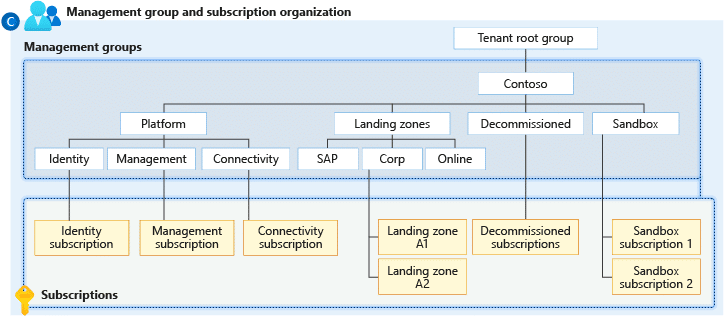
Diagram source : https://learn.microsoft.com/en-us/azure/governance/management-groups/overview
The Architecture: What Is the Maximum Hierarchy Depth for Azure Management Groups?
Here's where things get interesting. Azure gives you six levels of depth in your management group hierarchy, not counting the root level and subscriptions. That's like having a six-story building to organize your cloud resources – plenty of room to get creative, but not so much that you'll get lost.
Let me share a real-world structure that actually works:
| Level | Purpose | Example |
|---|---|---|
| Root | Overall governance | kloudschoolTenant Root |
| Level 1 | Environment separation | Production / Non-Production |
| Level 2 | Business units | Finance / Marketing / IT |
| Level 3 | Geographic regions | North America / Europe / Asia |
| Level 4 | Applications | CRM / ERP / Web Apps |
| Level 5 | Teams | Frontend / Backend / Database |
| Level 6 | Projects | Project Alpha / Project Beta |
But here's my advice: just because you can go six levels deep doesn't mean you should. I've seen organizations create Byzantine hierarchies that would make Kafka proud. Keep it simple, keep it logical, and remember – you can always adjust later.
How Do Policies Apply Across Azure Management Groups? The Cascading Effect
This is where the rubber meets the road. Azure Policy assignment at the management group level is like setting DNA for your entire cloud infrastructure. These policies cascade down through the hierarchy, ensuring consistent governance without the manual grunt work.
Let's say you want to enforce encryption on all storage accounts. Instead of applying this policy to each subscription individually (and probably missing a few), you apply it once at the management group level. Boom – every subscription underneath automatically inherits this policy. It's governance on autopilot.
The inheritance rules are straightforward:
- Policies flow from parent to child
- You can't override inherited policies at lower levels (security first!)
- Multiple policies can layer on top of each other
- Exemptions can be created when absolutely necessary
I remember helping a financial services firm implement Azure compliance using management groups. They needed different security standards for their trading platform versus their corporate website. We created separate management groups with tailored policies – the trading platform got Fort Knox-level security, while the corporate site maintained flexibility for rapid updates.
Can I Move Subscriptions Between Different Management Groups? Absolutely!
Here's something that'll make your life easier: moving subscriptions in Azure Management Groups is as simple as drag and drop (well, almost). You're not locked into your initial structure – Azure understands that businesses evolve, and your governance model should too.
The process is refreshingly straightforward:
- Navigate to your management groups in the Azure portal
- Select the subscription you want to move
- Choose the new parent management group
- Click move (and maybe grab a coffee while Azure works its magic)
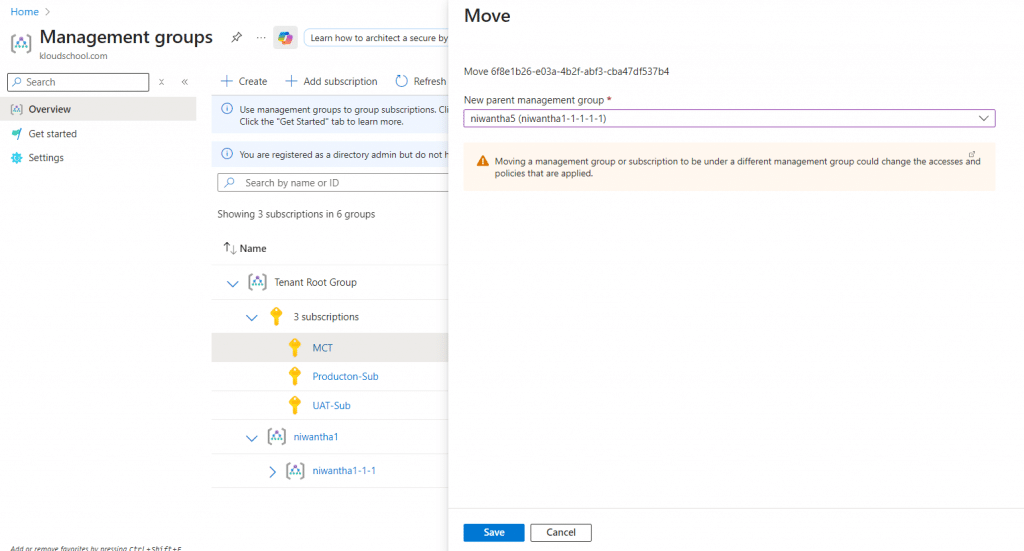
But – and this is important – moving subscriptions isn't like rearranging furniture. When you move a subscription:
- It immediately inherits policies from its new parent
- Existing RBAC assignments at the subscription level remain intact
- Any management group-level RBAC assignments change based on the new hierarchy
- Compliance assessments might need time to update
Pro tip: Always test subscription moves in a non-production environment first. I've seen confident admins move production subscriptions on a Friday afternoon. Don't be that person.
How Does Role-Based Access Control (RBAC) Work with Management Groups?
Now we're getting to the good stuff. Management group access control Azure style is like having a bouncer who knows exactly who belongs where. RBAC at the management group level is inheritance on steroids – assign once, apply everywhere below.
Picture this scenario: You hire a new security analyst who needs read-only access to all production environments. Without management groups, you'd be clicking through each subscription, adding permissions one by one. With management groups? One Azure Role assignment at management group level, and they're good to go.
Here's how the permission flow works:
- Roles assigned at management groups cascade to all child resources
- Higher-level permissions override lower-level restrictions
- You can combine multiple roles for granular control
- Deny assignments (when needed) take precedence over allow
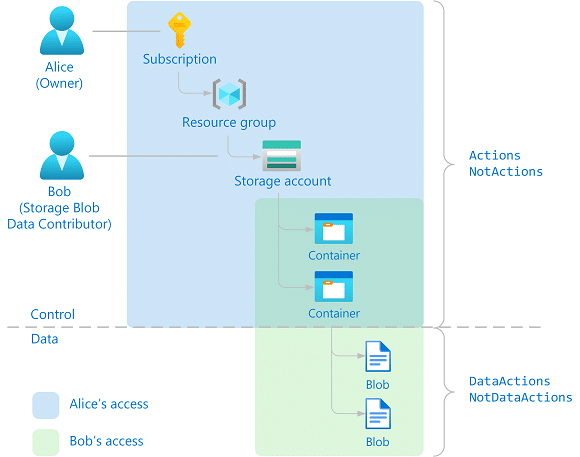
What Is the Difference Between Azure Resource Groups and Management Groups?
Ah, the classic confusion! I can't tell you how many times I've been asked this question. Let me clear this up once and for all with a simple analogy:
Resource Groups are like folders on your desktop – they organize related files (resources) that typically share the same lifecycle. You might have a resource group for a web app that includes the app service, database, and storage account.
Management Groups are like the filing cabinet that holds all those folders – they organize subscriptions and provide governance at scale. They're about the big picture, not the individual pieces.
| Aspect | Resource Groups | Management Groups |
|---|---|---|
| Scope | Resources within a subscription | Subscriptions and other management groups |
| Purpose | Logical grouping of resources | Governance and hierarchy |
| Policy Application | Can receive policies | Can define and inherit policies |
| RBAC | Resource-level permissions | Subscription-level permissions |
| Lifecycle | Typically project or app-based | Organizational structure |
Think of it this way: Resource groups are tactical, management groups are strategic. You need both for a well-oiled Azure machine.
How Many Management Groups Can I Have in an Azure Tenant?
Here's where Azure shows its enterprise muscle. You can have up to 10,000 management groups in a single tenant. Yes, you read that right – ten thousand! That's enough to organize even the most complex multinational corporation with room to spare.
But before you go management group crazy, consider this:
- Each management group can have multiple subscriptions
- You're limited to that six-level depth we talked about
- More groups mean more complexity to manage
- Performance can degrade with extremely complex hierarchies
In my experience, most organizations need between 10-50 management groups. If you're pushing past 100, it's time to ask yourself: "Am I overcomplicating this?"
How Do Management Groups Integrate with Azure Policy and Compliance?
This integration is where Azure governance models with management groups really shine. It's like having a compliance officer who never sleeps, never takes vacation, and catches everything.
Azure Policy and compliance work seamlessly with management groups through:
- Policy Initiatives: Bundle multiple policies and apply them as a set
- Compliance Dashboards: Get real-time visibility across your entire hierarchy
- Regulatory Standards: Implement ISO 27001, HIPAA, or PCI-DSS with built-in policies
- Custom Policies: Create your own rules that match your unique requirements
I recently helped a healthcare provider implement HIPAA compliance across 23 subscriptions. We created a dedicated "Healthcare Compliance" management group, applied the Azure HIPAA/HITRUST initiative, and within hours, every resource was being evaluated against healthcare standards. What would have taken weeks manually was done before lunch.
Using Azure Blueprints with management groups takes this even further. Blueprints are like templates on steroids – they package policies, role assignments, and resource templates into reusable definitions. Apply a blueprint to a management group, and every new subscription automatically gets the full treatment.
What Are Best Practices for Designing Azure Management Group Hierarchies?
Alright, let's talk strategy. After helping dozens of organizations design their hierarchies, I've learned what works and what turns into a governance nightmare. Here are my battle-tested Azure Management Groups best practices:
✅Start Simple, Evolve Gradually
Don't try to boil the ocean on day one. Begin with a basic structure:
- Production vs. Non-Production at the top level
- Add complexity only when you have a clear need
- Document every decision (future you will thank present you)
✅Follow the Principle of Least Privilege
- Assign permissions at the lowest appropriate level
- Use management groups for broad access, not specific resource permissions
- Regular access reviews are your friend
✅Design for Your Organization, Not the Textbook
I've seen companies copy Microsoft's reference architecture verbatim. Spoiler alert: your company isn't Microsoft. Consider:
- Your team structure
- Compliance requirements
- Business goals
- Current technical debt
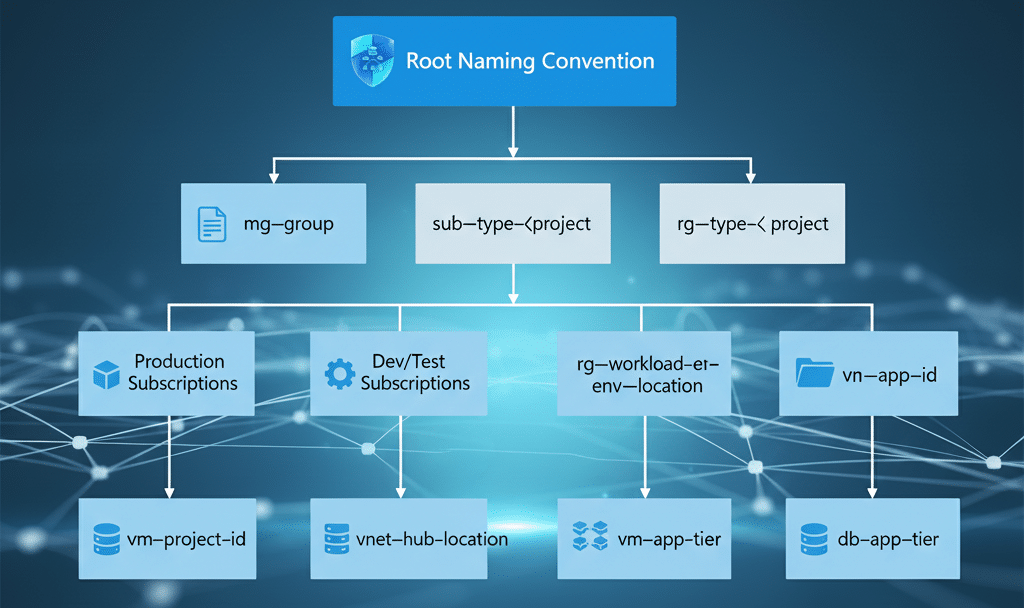
✅Create Clear Naming Conventions
Nothing fancy here – just be consistent:
- Use prefixes for different levels (ENV-, BU-, TEAM-)
- Avoid special characters that might break automation
- Make names self-documenting
Plan for Special Cases
Sandbox Environment with Azure Management Groups: Create a dedicated "playground" management group where developers can experiment without fear. Apply spending limits but relax other policies.
Azure Billing Consolidation Management Groups: Structure groups to align with your cost centers. This makes centralized monitoring for Azure management groups and chargeback models much easier.
Automate Everything You Can
Management group automation Azure style means:
- Use Azure DevOps or GitHub Actions for hierarchy changes
- Implement Policy as Code
- Automate compliance reporting
- Set up alerts for unauthorized changes
Here's a structure that's worked well for many of my clients:
Tenant Root Group
├── Production
│   ├── Business Critical
│   │   ├── Finance Systems
│   │   └── Customer Data
│   └── Standard Production
│       ├── Web Applications
│       └── Internal Tools
├── Non-Production
│   ├── Development
│   │   └── [Developer Subscriptions]
│   ├── Testing
│   │   └── [QA Subscriptions]
│   └── Sandbox
│       └── [Experimental Subscriptions]
└── Platform
    ├── Identity
    ├── Management
    └── Connectivity
Advanced Techniques: Taking Your Management Groups to the Next Level
Let's dive into some advanced scenarios that'll make you look like an Azure wizard at your next team meeting.
Resource Tagging Strategies
Azure resource tagging management groups work beautifully together. Enforce tagging policies at the management group level:
- Require cost center tags for chargeback
- Mandate environment tags for clarity
- Enforce owner tags for accountability
Managing Multiple Azure Subscriptions Like a Pro
When you're juggling managing multiple Azure subscriptions, think in terms of patterns:
- Create template subscriptions for common scenarios
- Use management groups to enforce subscription-level quotas
- Implement automatic subscription provisioning with proper governance
The Dev/Test Scenario
Here's a neat trick: Create separate management groups for development and testing, but mirror your production structure underneath. This way, developers work in an environment that matches production governance without the risk.
Cross-Subscription Networking
Use management groups to enforce network policies:
- Require specific DNS settings
- Enforce hub-spoke network topologies
- Mandate network security group rules
Common Pitfalls (And How to Dodge Them)
Let me save you from some headaches I've witnessed (and occasionally caused myself):
The Over-Engineering Trap: Just because Azure supports six levels doesn't mean you need all six. I've seen organizations create hierarchies so complex that no one understands them six months later.
The Permission Explosion: Be careful with RBAC at management groups. That "quick fix" of giving someone owner rights at a high-level management group? Yeah, that's how security incidents happen.
The Policy Conflict Nightmare: When multiple policies apply to the same resource, conflicts can occur. Always test policy combinations in a sandbox first.
The Migration Migraine: Moving from a flat structure to management groups? Don't do it all at once. Migrate subscription by subscription, testing as you go.
Real-World Success Story
Let me share a transformation story that still makes me smile. A retail company came to me with 85 subscriptions spread across 12 countries. Their Azure bill was astronomical, compliance was a nightmare, and their IT team was burning out.
We implemented a management group hierarchy based on:
- Geographic regions (for data residency)
- Environment types (prod/non-prod)
- Business units (retail, e-commerce, corporate)
The results after six months:
- 30% reduction in Azure spend through better policy enforcement
- Compliance audit time cut by 75%
- New environment provisioning reduced from days to hours
- IT team morale through the roof
The secret? We didn't try to solve everything at once. We started with cost management policies, added security controls, then gradually refined the structure based on real-world usage.
Your Action Plan: Getting Started Today
Ready to transform your Azure chaos into governance gold? Here's your roadmap:
- Assess Your Current State: Document existing subscriptions and their purposes
- Design Your Hierarchy: Start simple – even just Production/Non-Production
- Create Your First Management Group: Use the Azure Portal or PowerShell
- Move One Test Subscription: Get comfortable with the process
- Apply Your First Policy: Start with something non-breaking like requiring tags
- Monitor and Adjust: Use Azure Policy compliance dashboard
- Gradually Expand: Add more subscriptions and policies over time
The Bottom Line: Why This Matters
Look, I get it. Governance isn't sexy. It doesn't have the appeal of deploying cutting-edge AI models or building blazing-fast applications. But here's the thing – without proper governance through Azure Management Groups, those exciting projects can quickly turn into expensive, non-compliant disasters.
Management groups aren't just about organization; they're about enabling innovation at scale. When your governance is automated and invisible, your teams can focus on what they do best: building amazing things.
Whether you're managing a handful of subscriptions or hundreds, whether you're in a startup or a Fortune 500, Azure Management Groups give you the control and flexibility to govern your cloud like a pro. The best part? You can start small and grow as your needs evolve.
So, what are you waiting for? Your Azure subscriptions are begging for some organizational love. Start with one management group, apply one policy, and watch how quickly things fall into place. Trust me, six months from now, you'll wonder how you ever lived without them.
Remember: great cloud governance isn't about restrictions – it's about creating guardrails that let your teams run fast without running off the cliff. And that's exactly what Azure Management Groups deliver.
Now go forth and organize! Your future self (and your CFO) will thank you.
Want to dive deeper into Azure governance? Drop a comment below with your biggest management group challenge, and let's solve it together. Because sometimes, the best solutions come from the community, not the documentation.





No comments yet. Be the first to share your thoughts!